

Keeping your Qatar ID (QID) valid is essential for living and working in Qatar. An expired QID can instantly disrupt your daily life, from losing access to healthcare and banking services to facing issues at work or with government benefits. Whether you’re a Qatari citizen or an expatriate resident, maintaining an active Qatar ID is the key to confirming your legal residency status and enjoying uninterrupted services across the country and the wider GCC region.
In 2026, the MOI Qatar ID renewal process has become easier than ever, with multiple options available through the Metrash app, the MOI website, and in-person service centers. This complete guide explains everything you need for your Qatar ID renewal.
Qatar ID Renewal New Rules
- Qatar ID renewal can now be started up to three months before the expiration date.
- The 90-day grace period for renewal remains unchanged.
- Biometric data updates are now mandatory for all renewal categories.
- Your passport must have at least six months of validity to complete the renewal.
- Employers are responsible for renewing IDs for employees.
- Sponsors are responsible for renewing IDs for their family members.
Who Needs to Renew Their Qatar ID?
- Residents and expats whose Qatar ID is about to expire.
- Family members sponsored by Qatari residents or companies.
- Employees whose companies act as sponsors.
Renewing on time is essential to avoid penalties, travel issues, or complications with government services.
Qatar ID Renewal Requirements
To renew your Qatar ID (QID), you typically need your old QID, a valid passport, your sponsor’s ID (for workers or dependents), proof of relationship (for family members), and, in some cases, updated biometric data.
Qatar ID Renewal Online
Qatar ID renewal is simple and can be completed through multiple convenient methods.
Method 1: MOI Qatar ID Renewal
The MOI website provides the simple and easy steps to complete your Qatar ID renewal process.
- Visit the MOI website.
- Click on “E-Services” on the homepage.
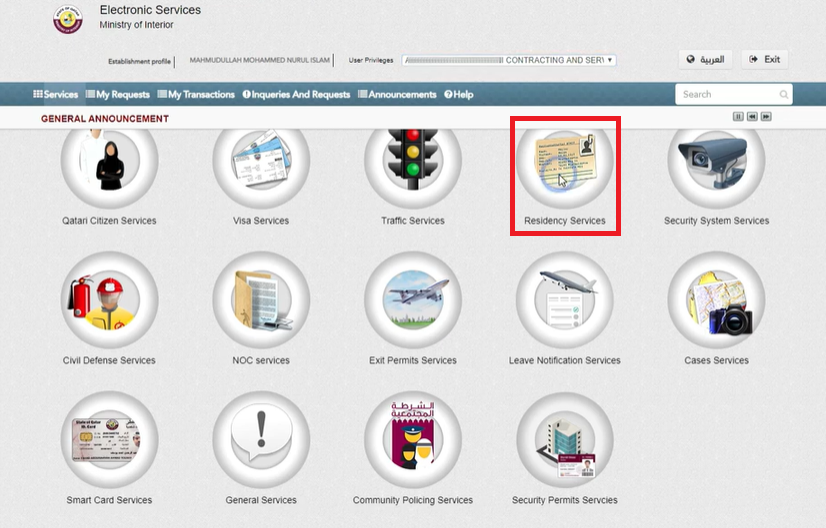
- Click on “Residency Service.”
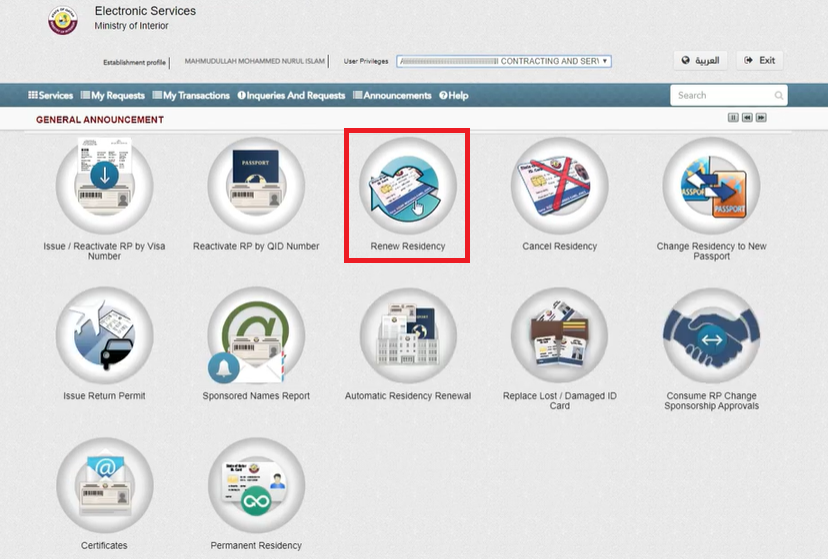
- Tap on “Renew Residency.”
- Enter your “QID” in the designated field and click on “Add.”
- Tap on “Next.”
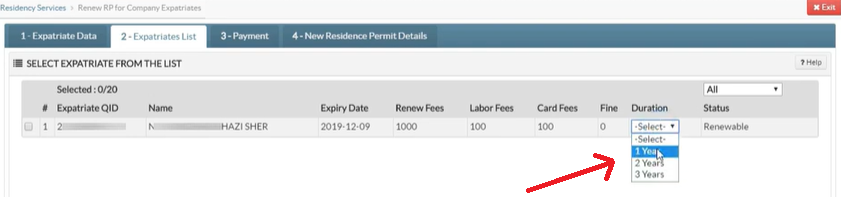
- Select your QID duration, e.g., 1 year, 2 years, or 3 years.
- Click on “Next.”
- If you choose delivery, enter your “Address” and click on “confirm.”
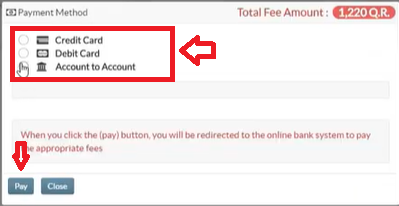
- Tap the “Pay” button and choose your payment method, like “Debit/Credit Card” or “Account-to-Account.”
- Hit the “Pay” button.
- Enter your “Card Detail” and tap on “Pay Now.”
- Now you can receive an OTP code through your registered mobile number.
- Enter the “Code” and click on “Submit.”
- After clicking “Submit,” a confirmation receipt will appear; print it for future reference.
Method 2: METRASH App
The METRASH app also provides an easy way to renew your QID.
- Install the “METRASH App.”
- Open the app on your device and log in to your account.
- Click on “Residency.”

- Tap on “Residency Renewal.”
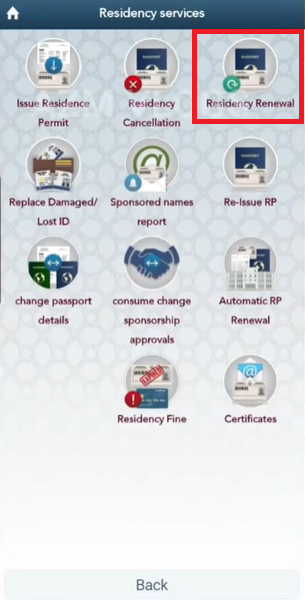
- Enter your “QID” number and click on “Add.”
- Select your “QID Duration.”
- Click on “Next.”

- If you choose the delivery option, then enter your address carefully and click on “Next.”
- Choose your “Payment Methods.”
- Enter the required detail and click on “Pay Now” and renew your QID.
Method 3: MOI Service Center
- Gather Required Documents
- Current QID
- Copy of your QID
- Completed renewal form.
- Visit MOI Service Center
- Locations: Al Khor, Al Wakrah, Al Rayyan, Mesaimeer
- Operating hours: Sunday to Thursday, 7:00 AM – 12:30 PM
- Submit Application
- Hand your documents to the staff for verification
- Pay the Fee
- Payment accepted via cash or card
- Fees are the same as online rates
- Collect Your Renewed QID
- Either pick up your new QID later or wait at the center for urgent processing
Note: Bring your receipt when collecting your ID
MOI Qatar ID Renewal Form
Qatar ID Renewal Via Video Guide
Qatar ID Renewal Fees
| Category | 1-Year | 2-Years | 3-Year (20% Discount) |
|---|---|---|---|
| Children | QAR 200 | QAR 400 | QAR 600 |
| Students | QAR 300 | QAR 600 | QAR 900 |
| Family Members | QAR 500 | QAR 1,000 | QAR 1,500 |
| Workers | QAR 1,000 | QAR 2,000 | QAR 3,000 |
| Citizens | No Fee | No Fee | No Fee |
Additional Cost
| Service | QAR |
|---|---|
| Qatar Post Delivery | 20 |
| Smart QID Issuance | 100 |
| Additional Security Features | 150 |
| Replacement | 200 |
Qatar ID Renewal Time
Qatar ID renewal usually takes 3–5 working days for online applications and 7–10 working days for in-person renewals. Processing times may vary depending on workload and the chosen method.
Qatar ID Renewal Grace Period
You have a 90-day grace period after your Qatar ID expires to renew it without a fine. If you miss this period, a fine of QAR 10 per day applies, up to a maximum of QAR 6,000. To avoid penalties, make sure to submit your renewal on time.
Qatar ID Renewal Tracking
- Visit MOI.
- Tap on “Inquiries.”
- Click on “RP Renewal Tracking” under the “Residency Permits Inquiry.”
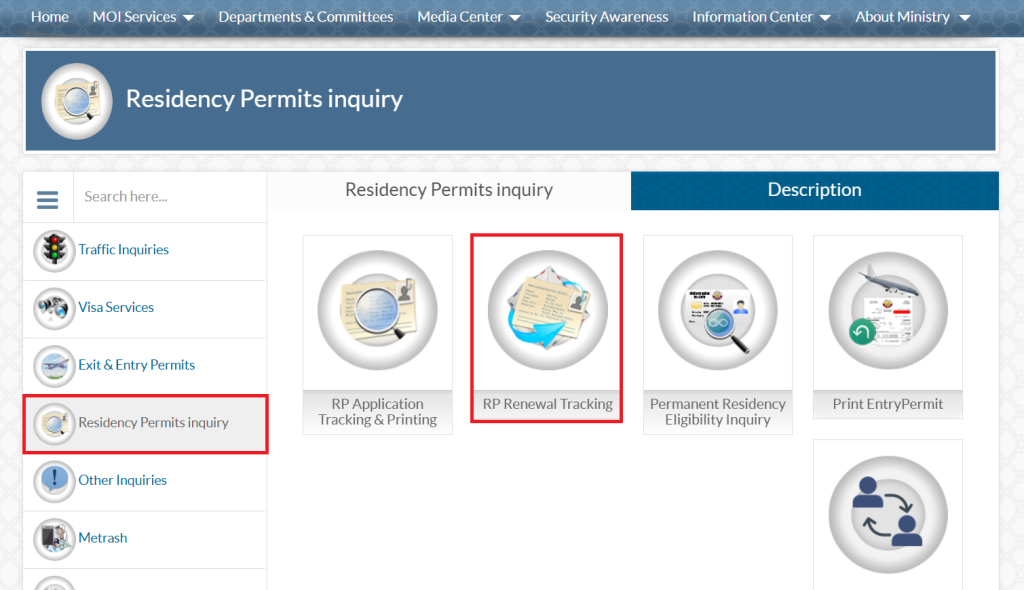
- Enter the “QID Number” and fill out the “CAPTCHA.”
- Click on “Submit.”
How To Check Qatar ID Renewal Status
Follow these simple steps to check your QID renewal status.
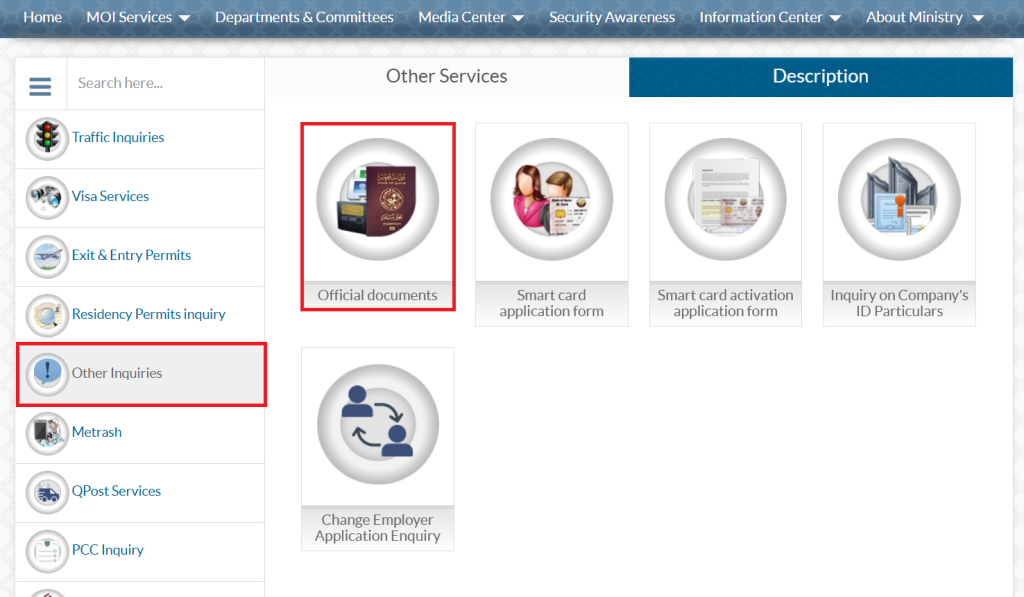
- Go to the MOI website.
- Click on “Inquiries.”
- Select “official documents” under “Other Inquiries.”
- Enter “QID Number” or “Passport Number.”
- Select your “Nationality.”
- Fill out the “CAPTCHA.”
- Tap on “Search” and check your status.
Can You Use Your Qatar ID While It’s Being Renewed?
Yes, in most cases, you can continue using your Qatar ID during the renewal process, provided it is still within the valid or grace period. Government systems and apps like Metrash typically display your ID as “under process,” allowing access to many services.
What to Do If Your QID Has Expired While You’re Abroad
- Contact your sponsor right away.
- Your sponsor is responsible for applying for a re-entry permit at the Ministry of Interior (MOI).
- Once approved, the permit will be sent to you electronically.
- You must present this permit when returning to Qatar.
- Renew your Qatar ID (QID) promptly after your arrival.
Note: Without a re-entry permit, airlines may deny boarding to Qatar. Some may accept a QID image from your Metrash, but this is not guaranteed.
Tips for Smooth Qatar ID Renewal
Renewing your Qatar ID can be quick and hassle-free if you follow these practical tips:
- Start Early: Begin the renewal process up to 3 months before your Qatar ID expires.
- Check Passport Validity: Ensure your passport has at least 6 months remaining.
- Update Biometric Data: Complete mandatory biometric updates on time.
- Keep Documents Ready: Prepare your old Qatar ID, passport, and recent photo (if required).
- Use Metrash: Renew online through the app to save time and avoid long queues.
- Book Appointments Online: Schedule any in-person visits through Metrash2 to ensure availability.
- Pay Fees Promptly: Complete renewal payments on time to avoid delays or rejection.
- Monitor Application Status: Regularly check Metrash notifications for updates or additional requests.
- Avoid Common Mistakes: Double-check all personal information before submission.
- Contact MOI if Needed: Reach out to MOI support immediately if issues or delays occur.
Common Qatar ID Renewal Problems & Solutions
Renewing your Qatar ID is usually straightforward, but residents and expats sometimes face issues. Here’s a list of the most common problems and how to solve them:
1. Expired Passport
- Problem: Qatar ID renewal cannot proceed if your passport has less than 6 months validity.
- Solution: Renew your passport first, then start the Qatar ID renewal process. Always ensure your passport is valid before beginning renewal.
2. Biometric Data Errors
- Problem: Fingerprint or photo data may be rejected if outdated or unclear.
- Solution: Visit an MOI service center to resubmit biometric data. Ensure fingers are clean and photos meet the official specifications.
3. Delayed Processing
- Problem: Renewal takes longer than expected.
- Solution: Check the status on Metrash2. If it exceeds 10 days, contact MOI for updates. Delays often occur due to document verification or technical issues.
4. Rejected Applications
- Problem: Application may be rejected due to incorrect information, missing documents, or unpaid fees.
- Solution: Double-check all personal information, upload the correct documents, and confirm that the renewal fee is paid. Reapply if necessary.
5. Issues While Abroad
- Problem: Your Qatar ID expires while you are outside the country.
- Solution: Request a re-entry permit through your sponsor via MOI. Carry the permit and Qatar ID confirmation when traveling back. Renew your ID immediately upon returning.
Technical Problems in Metrash2
- Problem: App errors, login issues, or payment failures.
- Solution: Update the app to the latest version, clear the cache, or try a different device. Contact MOI support if the problem persists.
FAQs About Qatar ID Renewal
How do I renew my Qatar ID?
- Open the MOI Qatar Portal.
- Navigate to the “E-Services” section.
- Select “Residency Services” and then click “Renew Residency.”
- Enter your QID number.
- Choose the renewal duration (1, 2, or 3 years).
- Confirm the details and pay the fee online.
What’s the Qatar ID renewal fee?
The Qatar ID renewal fee is approximately QAR 500. You can complete the renewal either online or through the offline application process.
How many days to renew qid?
Qatar ID (QID) renewal usually takes 3–5 business days for online applications, while in-person renewals at an MOI service center typically take 7–10 business days.
Conclusion
Timely Qatar ID renewal ensures uninterrupted access to essential services, legal residency, and smooth travel within Qatar. By following updated MOI guidelines, using Metrash or service centers, and keeping documents ready, residents and expats can avoid penalties and complications.