
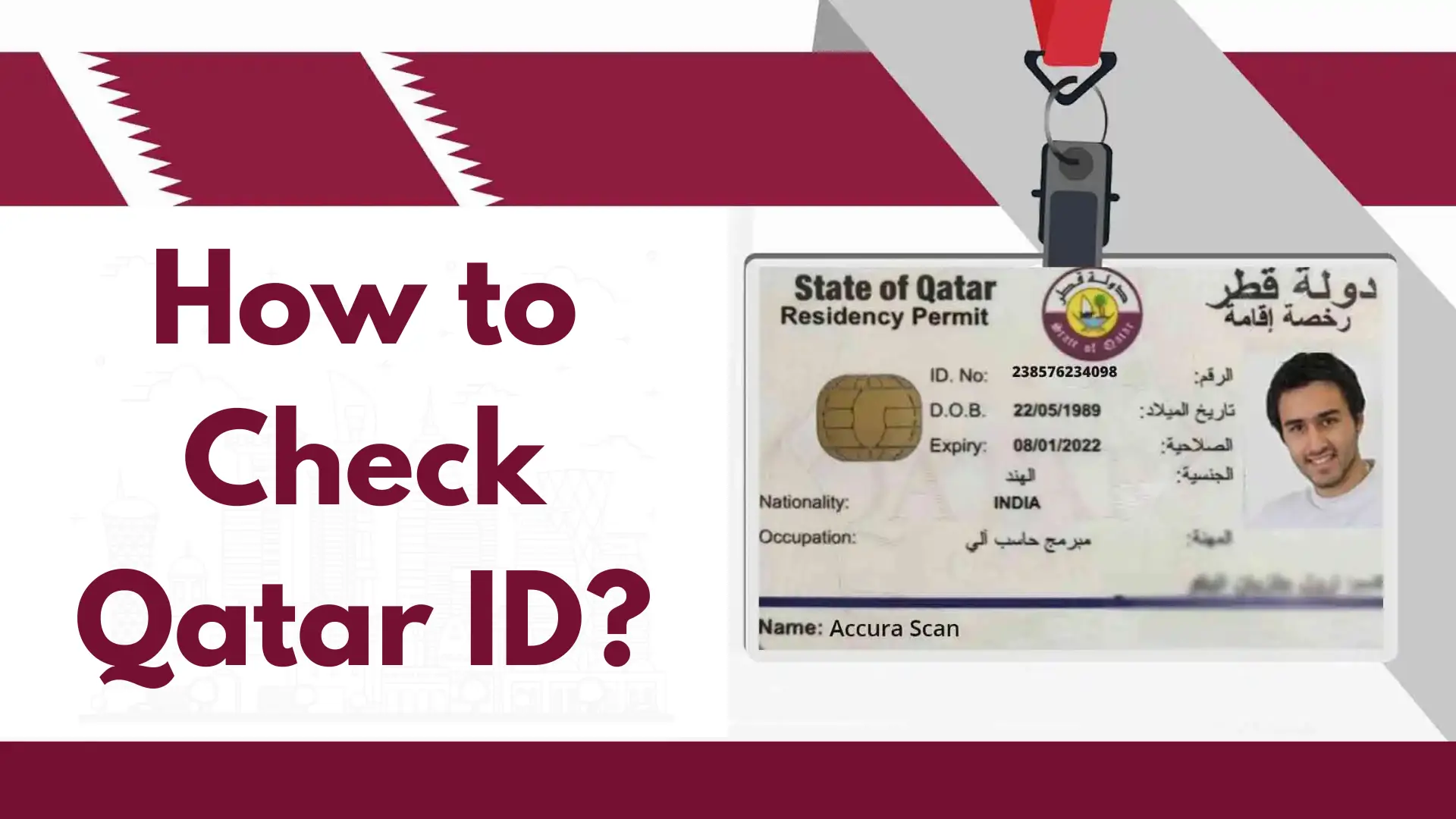
Qatar ID Check is an easy online service that helps people living in Qatar see if their Qatar ID is still valid. Every resident and worker in Qatar must have a Qatar ID to prove who they are and to use important services like jobs, banks, and hospitals. With the Qatar ID Check, you can quickly find your ID number, expiry date, and status using the Ministry of Interior (MOI) Qatar website. It’s a fast and simple way to make sure your ID is active and updated.
How the Qatar ID Check Form Works?
This form lets you search official records in two ways:
- By QID Number (default option)
- By Passport Number (with nationality selection)
You’ll also see a captcha (image or audio) to confirm you’re a real user before you submit.
Official Source for Qatar ID Check
Residents can verify their Qatar ID status through the official Ministry of Interior (MOI) portal. The MOI Qatar website provides secure access to ID validity, residency information, and visa status. Always use the official government portal to avoid incorrect information or fraudulent websites.
Official Website: https://portal.moi.gov.qa
How to Check Qatar ID?
It is very easy and simple to follow these steps for Qatar ID Check:
Step 1: Visit the official “Qatar ID Check” website.
Step 2: Enter your “QID Number.”
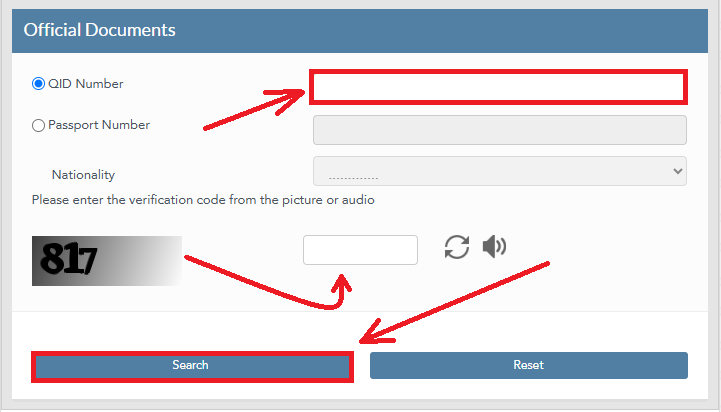
Step 3: Fill out the “CAPTCHA” and click on the “Search” button
MOI Qatar ID Check Online
It is very easy and simple to follow these two main methods for completing your Qatar ID Check:
Method 1: Qatar ID Check by QID Number
It is very easy and simple to check your Qatar ID by following these quick steps using your QID number:
Step 1: Visit the official “Qatar ID Check” website.
Step 2: Enter your “QID Number.”
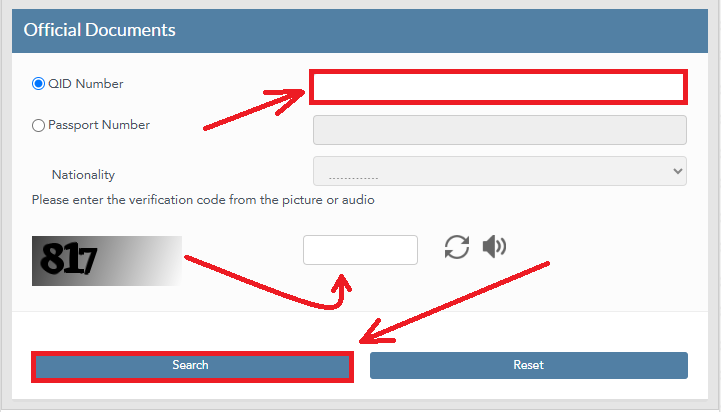
Step 3: Fill out the “CAPTCHA” and click on the “Search” button
Method 2: Qatar ID Check by Passport Number
It is very easy and simple to check your Qatar ID by following these quick steps using your passport number:
Step 1: Visit the official “Qatar ID Check” website.
Step 2: Enter your “Passport Number.”
Step 3: Select your “Nationality.”
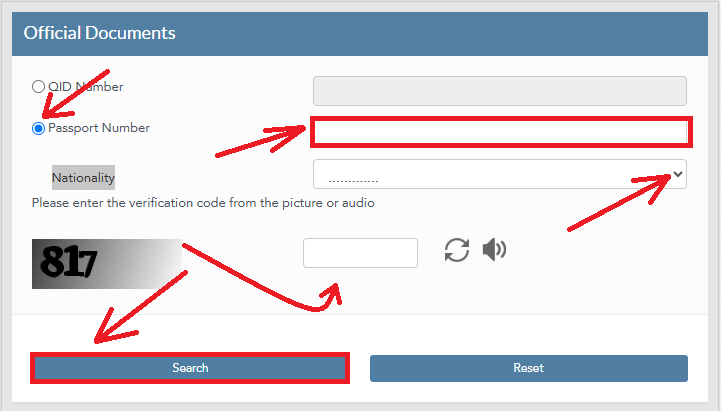
Step 4: Fill out the “CAPTCHA” and click on the “Search” button
Qatar ID Check Using the Metrash App
Here’s how you can easily check your Qatar ID through the Metrash mobile app:
- Install the App: Download the official Metrash app from the Apple App Store or Google Play Store.
- Log In: Open the app and sign in using your Qatar ID number and password.
- Go to Profile: Tap the “Profile” option at the bottom of the screen.
- Open Wallet: Inside your profile, select the “Wallet” section.
- View ID Card: Tap on “ID Card” to see your digital Qatar ID, showing your expiry date, visa details, sponsor name, and personal information.
- Explore More Services: You can also check other features like traffic violations, family details, and visa information directly through the app.
This method is quick, safe, and helps you access all your essential Qatar ID information anytime.
Qatar ID Check by Video Guide
Qatar ID Check Offline
If you don’t have internet access, you can still do a Qatar ID Check offline through SMS. This method is quick and works on any mobile phone. Simply use the number linked to your Qatar ID to send a text message and get your ID details instantly.

- Make sure your mobile number is registered with your Qatar ID.
- Open your phone’s messaging app.
- Type your 11-digit Qatar ID number in the message box.
- Send the message to 92992.
- You’ll receive an SMS reply showing your Qatar ID status and expiry date.
This simple offline method helps you stay updated on your QID validity anytime, even without an internet connection.
What is a Qatar ID?
The Qatar ID is an official document of identification and residency that is issued by the Ministry of Interior (MOI).
Who Can Use the Qatar ID Check Service?
The Qatar ID Check service is available for:
- Qatar citizens
- Foreign workers living in Qatar
- Family visa holders
- Students and residents
- Employers verifying employee status
What is Qatar ID Number?
Qatar ID numbers are unique 11-digit numbers on Qatar ID cards, which serve as official identification for citizens and residents. All essential services are available through the number, including banking, government portals, and the Metrash app. Your ID number can be found on the front of your physical card.
When Should You Check Your Qatar ID Status?
- Before renewing your residency permit
- Before applying for government services
- When changing jobs or sponsors
- Before international travel
- If you suspect your ID may have expired
Why Regular Qatar ID Checks Matter?
- Avoid fines or delays: Expired IDs can block services.
- Smooth renewals: Spot upcoming expiry dates early.
- Banking, jobs, healthcare: A valid QID keeps essential services accessible.
Quick Form Overview
| Field/Control | What It Does | Required? | Notes |
|---|---|---|---|
| QID Number | Search by your Qatar ID | Yes (if QID option chosen) | Up to 11 digits, numbers only |
| Passport Number | Search by your passport | Yes (if passport option chosen) | Enables Nationality |
| Nationality | Country selection | Yes (if passport option chosen) | Pick from the dropdown list |
| Captcha | Human verification | Yes | Image/audio options + refresh |
| Search | Submit your request | — | Returns your status |
| Reset | Clear form fields | — | Start fresh if needed |
Best Practices for a Smooth Qatar ID Check
- Use the right option: If you have your QID handy, use QID Number—it’s fastest.
- Match official details: Your passport number and nationality must match the official records.
- Check formatting:
- QID: digits only, no spaces.
- Passport: follow your exact passport format (letters/numbers).
- Captcha clarity: If unreadable, click refresh or switch to audio.
- Stable connection: A steady internet connection helps avoid timeouts.
Common Errors & Easy Fixes
- Invalid QID/Passport: Re-enter carefully. Ensure the right search method is selected.
- Captcha failed: Refresh captcha and type again; switch to audio if needed.
- Nationality disabled: It becomes active only when Passport Number is selected.
- Nothing happens on submit: Make sure all required fields are filled and captcha is correct.
Security Tips for Qatar ID Check
- Always verify your ID on the official MOI Qatar website.
- Never share your Qatar ID number on unknown websites.
- Avoid checking your ID status on public computers.
- Ensure your internet connection is secure when entering personal details.
- Do not share OTP or login credentials with anyone.
Quick Safety Note
Always verify your details on the official MOI Qatar services page. Do not share your QID or passport number on untrusted websites.
Benefits of Qatar ID Check
Checking your Qatar ID (QID) regularly offers several important benefits for both residents and expatriates. Here are the key advantages:
- Verify ID Validity: Quickly confirm if your Qatar ID is still active and not expired, helping you avoid penalties or service disruptions.
- Track Expiry Dates: The Qatar ID Check lets you know your card’s expiry date, so you can renew it on time and stay legally compliant.
- Access Government Services: Many services in Qatar, like healthcare, banking, housing, and employment, require a valid QID. Checking ensures your ID is always ready for use.
- Avoid Legal Issues: Keeping your ID up to date prevents fines, visa cancellation, or problems with immigration and residency authorities.
- Easy Online Verification: With the MOI Qatar portal or Metrash2 app, you can check your ID status online anytime without visiting a government office.
- Confirm Sponsor Information: You can review your sponsor or employer details linked to your Qatar ID, ensuring all records are accurate.
- Peace of Mind: Regular checks help you stay stress-free knowing your ID and residency information are valid and updated.
Contact Details for Qatar ID
- E-mail: [email protected]
- Phone: 2366666
- Web: www.portal.moi.gov.qa
FAQs About Qatar ID Check
You can check your Qatar visa status online without going to an embassy, you can access real-time information by entering your visa number and passport number.
Enter your QID or passport number on the MOI Qatar website, complete the captcha, and click the search button.
You can check your Qatar visa status online without going to an embassy, you can access real-time information by entering your visa number and passport number.
To check your QID status, use the passport option on the MOI Qatar ID Check portal.
If your ID application or update is still under review, it means it has not yet been finalized.
Qatar IDs cost 100 QAR, whether they are smart or standard. A yearly fee of 100 QAR can be added for the e-gate service.
You can correct invalid status issues at the MOI center with your documents.
Yes. Select Passport Number, enter your passport, choose Nationality, and complete the CAPTCHA. RTA Fine Check is simple and mandatory if you live in the UAE.
Conclusion
The Qatar ID Check ensures residents easily verify their ID status, expiry date, and validity online or via the Metrash2 app. Regular checks help you stay legally compliant, avoid fines, and maintain smooth access to essential services across Qatar.
Great post! The step-by-step guide on checking the Qatar ID is really helpful. I appreciate the screenshots; they make it much easier to follow along. Thanks for sharing this information!