

Ooredoo Qatar is one of the country’s leading telecommunications providers, playing a vital role in connecting people, businesses, and communities across the nation. Known for its strong focus on innovation and digital transformation, Ooredoo delivers advanced mobile, internet, and enterprise solutions designed to meet modern connectivity needs. From high-speed 5G networks to reliable home broadband and smart digital services, the company supports Qatar’s vision for a digitally empowered society. With a customer-centric approach and continuous investment in technology, Ooredoo Qatar has become a key driver of communication, convenience, and digital growth in everyday life.
What is Ooredoo Qatar?
Ooredoo Qatar is a major telecommunications company in Qatar that provides mobile, internet, and digital communication services to individuals, businesses, and government organizations, supporting nationwide connectivity through advanced 4G and 5G networks.
Ooredoo Qatar Services in Qatar
- Mobile Services: Prepaid and postpaid plans, local and international calls, SMS, mobile data, 4G and 5G connectivity
- Internet Services: Home fiber broadband, Wi-Fi solutions, and fixed internet packages
- International Services: International calling offers, roaming bundles, and overseas data plans
- Entertainment Services: TV and streaming services, value-added content, and digital subscriptions
- Financial Services: Ooredoo Money for digital payments and money transfers
- Business & Enterprise Solutions: Cloud services, IoT solutions, data connectivity, cybersecurity, managed IT services, and smart solutions
- Customer Support Services: Self-care apps, online account management, and retail support across Qatar
Ooredoo Qatar Recharge
Ooredoo Qatar Recharge allows prepaid customers to top up their mobile balance quickly and easily using multiple methods. Ooredoo offers an easy and convenient way to recharge your account.
Ooredoo Qatar Recharge options:
- Recharge Cards: Dial 101 recharge-code # and press call.
- Ooredoo App: Recharge instantly using debit or credit cards.
- Ooredoo Website: Online recharge through secure payment options.
- USSD Menu: Dial *100# and follow the instructions.
- Retail Stores: Recharge at Ooredoo shops and authorized dealers.
- Banking Apps & ATMs: Recharge via selected Qatari banks.
How to Recharge Ooredoo Qatar Online
You can easily top up your Ooredoo Qatar number via the official website by following these steps:
- Visit the official Ooredoo Qatar website.
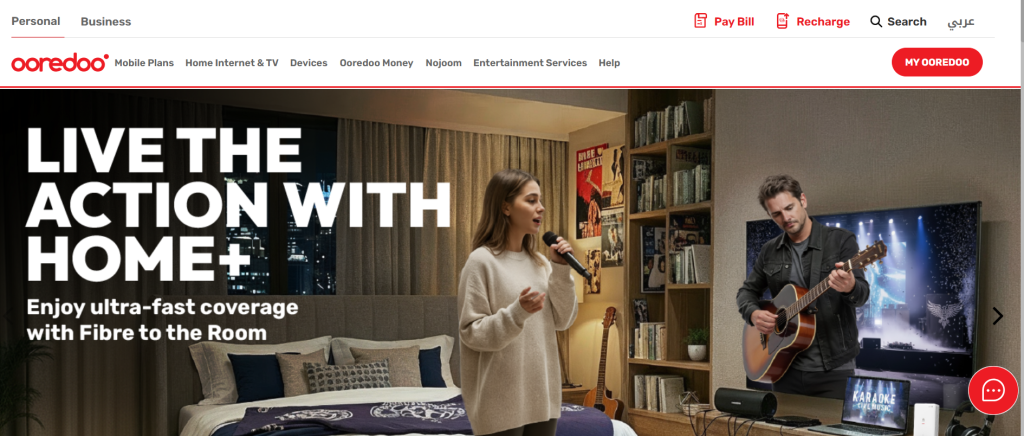
- Log in to your personal Ooredoo account.

- Click on the “Recharge” tab in your dashboard.
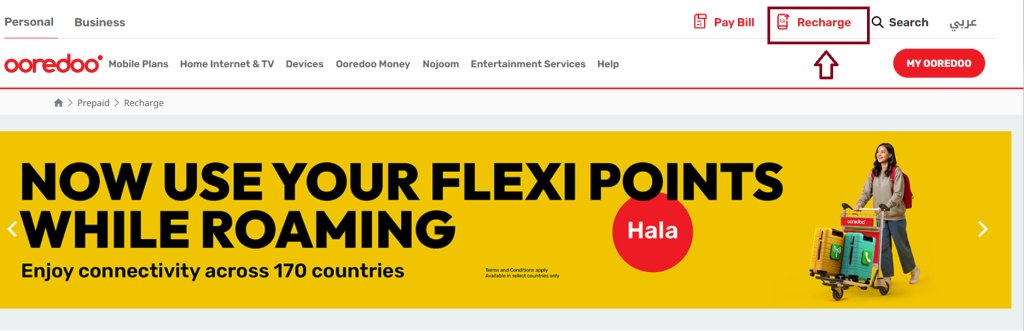
- Select the recharge amount or plan that suits your needs.

- Enter the mobile number you want to top up.
- Choose a payment method (credit or debit card).
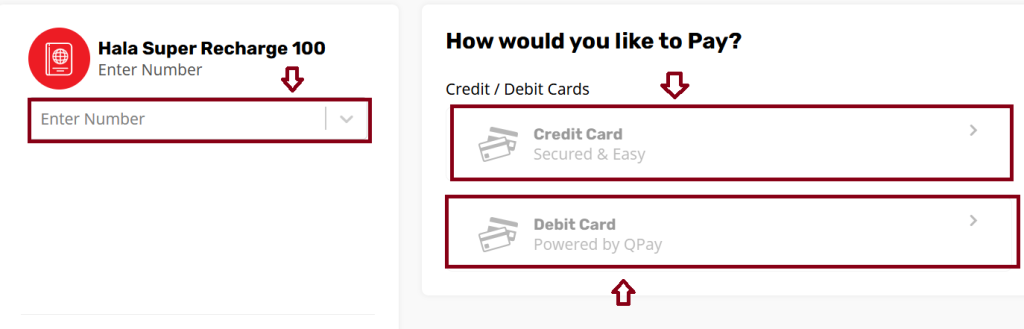
- Provide the required payment details.
- Confirm the transaction to complete the recharge.
- A confirmation message will appear once the recharge is successful.
Recharge Ooredoo Qatar via Ooredoo App
- Download the Ooredoo Qatar app from the Google Play Store and the App Store.


- Open the app on your mobile device.
- Set your language preference to English (if needed).
- Sign in using your Ooredoo number and password.
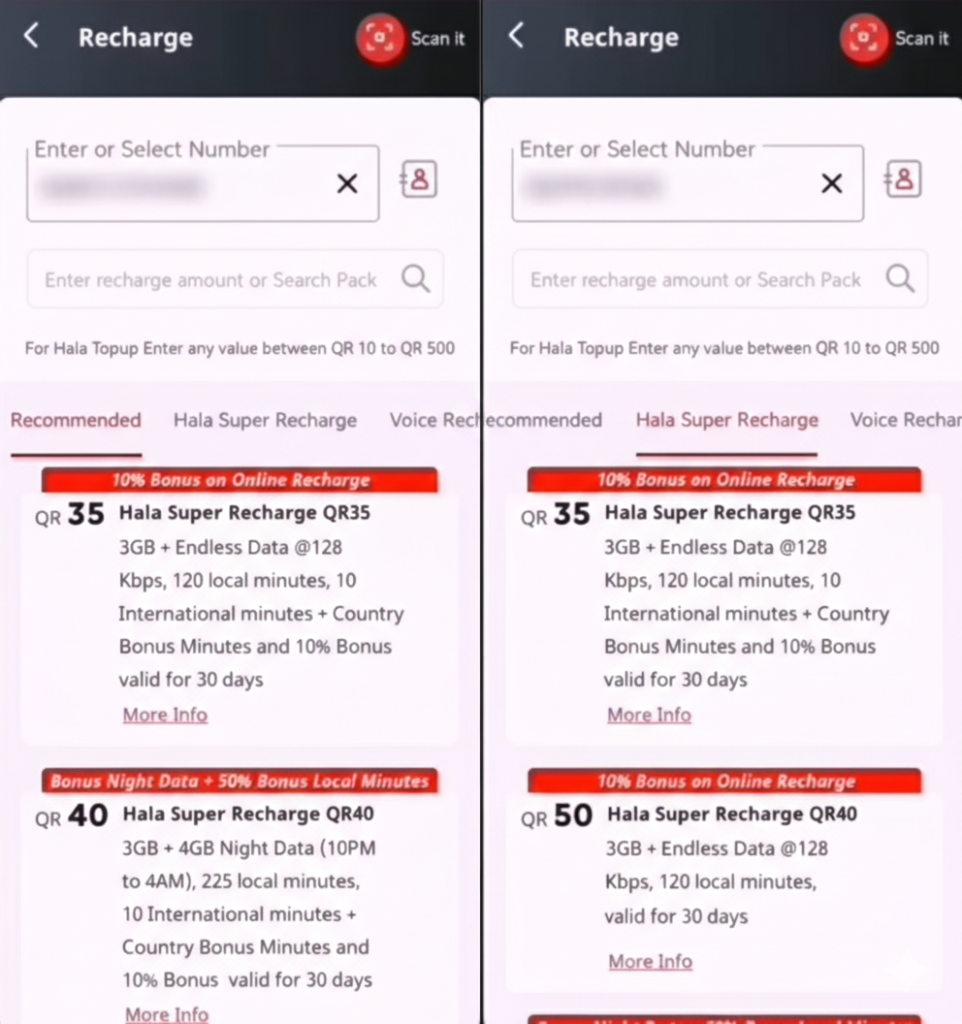
- Tap on the “Recharge” or “Top-Up” option.
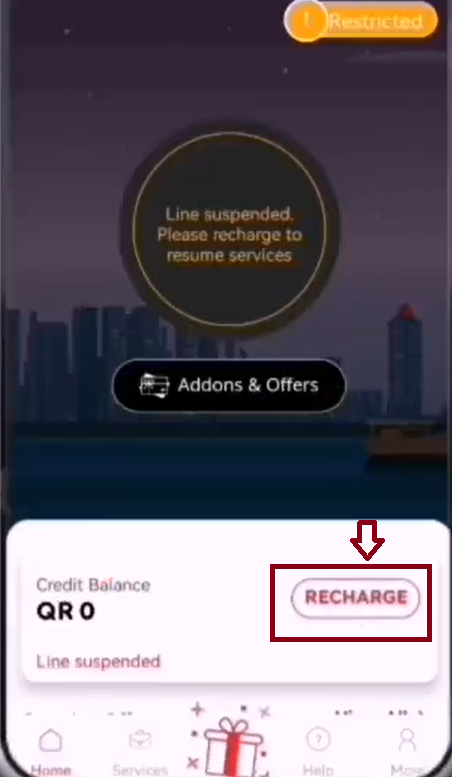
- Select the recharge amount that suits your needs.
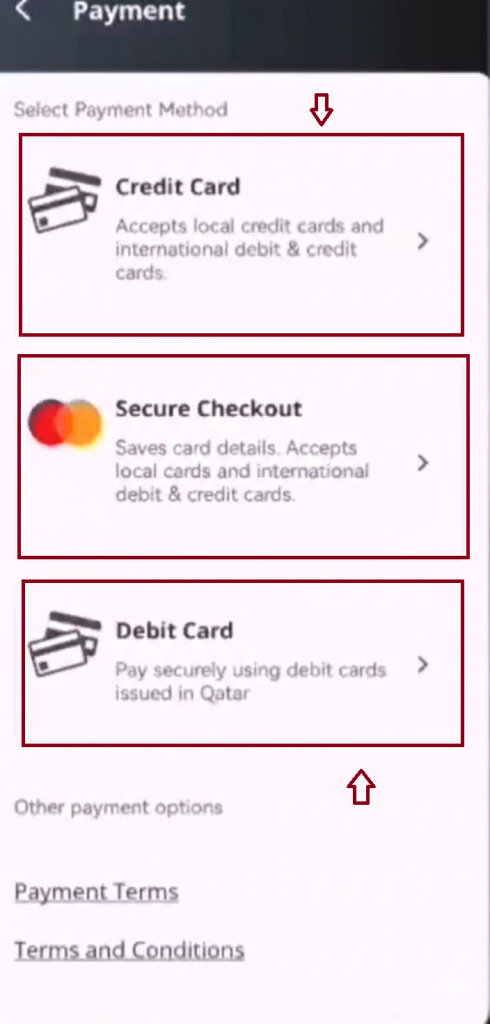
- Choose a payment method: credit card, debit card, or Ooredoo Money.
- Enter your payment information accurately.
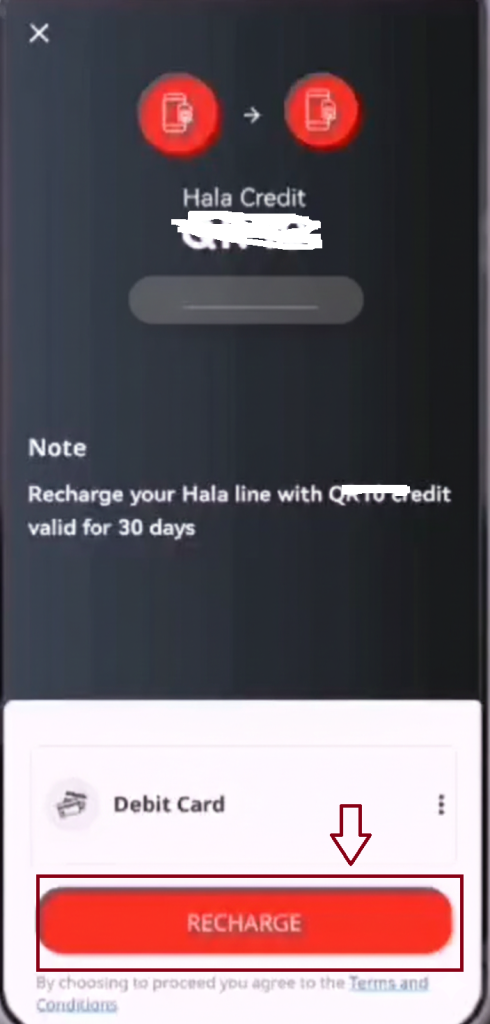
- Confirm the transaction to complete the recharge.
- A confirmation message will appear once the recharge is successful.
How to Recharge Ooredoo Qatar Via Recharge Code
You can top up your Ooredoo Qatar number instantly using a recharge code by following these steps:
- Purchase an Ooredoo recharge card from any Ooredoo store or authorized retailer.
- Dial
*101*<recharge code>#on your mobile phone. - Press the call/send button.
- Wait for the confirmation message indicating that your balance has been successfully updated.
Ooredoo Qatar Scratch Card Recharge
Scratch cards offer a simple and convenient way to recharge your Ooredoo number using a physical voucher:
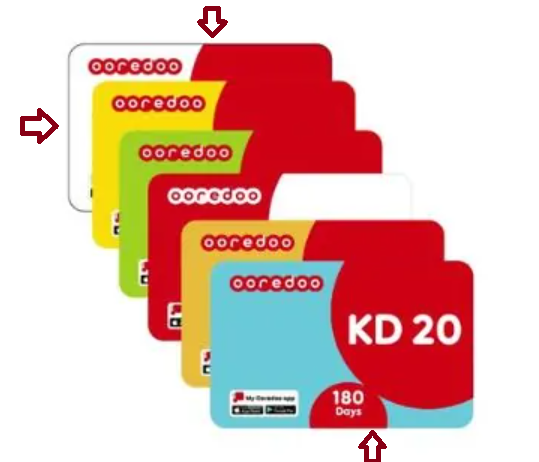
- Get an Ooredoo recharge card from any authorized retailer.
- Scratch off the protective layer to reveal the voucher code.
- Dial
*102*<voucher code>#on your Ooredoo mobile. - Follow the on-screen instructions.
- Confirm the recharge to add the balance to your account.
- This method is ideal for users who prefer recharging without using apps or online payment methods.
Ooredoo Qatar Recharge Via Self-Service Machines
Ooredoo self-service machines, available at Ooredoo stores and other locations across Qatar, allow quick and convenient recharges:
- Find a nearby Ooredoo self-service machine.
- Enter your mobile number or swipe your Ooredoo SIM card.
- Follow the on-screen instructions.
- Select your desired recharge amount.
- Choose a payment method: cash, credit/debit card, or Ooredoo Money.
- Complete the payment to recharge your account instantly.
Ooredoo Qatar Recharge Via Authorized Ooredoo Retailers
You can easily recharge your Ooredoo number through authorized retailers:
- Locate an authorized Ooredoo retailer, such as supermarkets, convenience stores, or kiosks.
- Buy a recharge voucher for the amount you need.
- Pay for the voucher at the store.
- Follow the instructions on the voucher to add the balance to your account.
This method is simple and accessible for users who prefer recharging in person.
Ooredoo Qatar Recharge Validity
| Recharge Type | Description | Validity |
|---|---|---|
| Prepaid Balance (Top-Up) | Standard prepaid recharge for calls and SMS | 30 days from recharge |
| Data Packs | Internet-only packs (daily, weekly, or monthly) | 1 day, 7 days, or 30 days (depending on pack) |
| Combo Packs | Includes voice, SMS, and data | Varies; usually 7 or 30 days |
| Extended Validity Packs | Recharges designed to extend account balance validity | Up to 90 days (check pack details) |
| Special Offers & Promotions | Limited-time packages with specific benefits | As mentioned in the offer |
Ooredoo Recharge Flexi Qatar
- Flexi Points System: Recharge gives points instead of fixed data/voice/SMS bundles.
- Flexible Usage: Points can be used for local calls, SMS, data, and international calls.
- Activation: Can be activated via USSD code or Ooredoo app after recharging.
- Carry Over: Unused points may roll over if another Flexi recharge is done before expiry.
- Validity: Typically 28 days from the date of recharge.
- Custom Usage: Lets you spend your balance according to your needs rather than fixed packs.
Ooredoo Flexi Recharge Code Qatar
- Activation Code: Dial
*127*<PIN>#to activate Flexi recharge. - SMS Option: Send the PIN to 127 to activate via SMS.
- Check Balance: Dial
*129*3#or use the Ooredoo app to view remaining Flexi Points. - Flexible Usage: Points can be spent on local calls, SMS, data, and international calls.
- Validity: Typically valid for 28 days from the date of recharge.
- Easy Access: Works directly from your mobile without needing online payment.
Ooredoo Flexi Recharge Details
Ooredoo Flexi recharges provide points that you can use for data, calls, and SMS. Each denomination (e.g., QR 10, QR 20) gives a set number of points with a specific validity period, which can be redeemed via the Ooredoo App or by dialing 10013#. Points are valid for a limited time (for example, 3 days for QR 10 and 7 days for QR 20) and can be used for both local and international services.
Ooredoo Qatar Recharge Via ATM Machines
You can conveniently recharge your Ooredoo prepaid number using ATM machines from participating banks in Qatar. You can top up your Ooredoo Qatar number using your QNB bank account by linking it to your Ooredoo Money (OM) Wallet. Once connected, you can recharge through the Ooredoo app or self-service machines (SSMs).
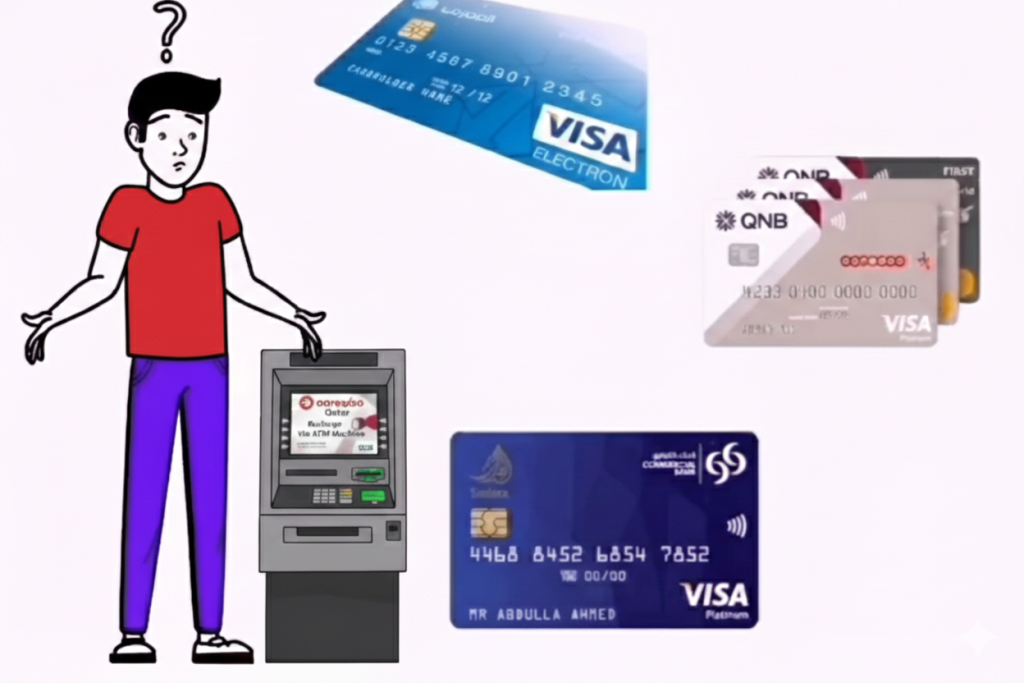
- Locate a participating ATM from banks supporting Ooredoo recharge (e.g., QNB, Doha Bank).
- Insert your debit/ATM card and enter your PIN.
- Select the “Mobile Recharge” or “Prepaid Recharge” option from the menu.
- Choose Ooredoo as your operator.
- Enter your Ooredoo mobile number.
- Select the recharge amount you want.
- Confirm the transaction. The amount will be deducted from your bank account.
- You will receive a confirmation message on your mobile once the recharge is successful.
Ooredoo Prepaid Recharge Plans
| Plan Name / Price | Data | Local Minutes | International Minutes | Validity |
|---|---|---|---|---|
| Super QR 15 | 1.5 GB | 60 | – | 10 days |
| Super QR 40 | 4 GB | 150 | Included | 28 days |
| Super QR 50 | 30 GB | 1000+150 | Included | 28 days |
| Super QR 250 | 30 GB + roaming bonus | Extra mins | Included | 180 days |
| Super QR 500 | 300 GB | 40,000 | Included | 28 days |
| Voice/Combo QR 15 | 100 MB | 150 | – | 10 days |
| Voice/Combo QR 40 | 100 MB | 500 | – | 28 days |
| Voice/Combo QR 50 | 100 MB | 700 | – | 28 days |
| Voice/Combo QR 65 | 115 MB | 1200+ | – | 28 days |
| Voice/Combo QR 75 | 115 MB | 1500+ | – | 28 days |
Data-Only & Roaming/International Packs & Validity
| Plan Name / Price | Data | Local Minutes | International Minutes | Validity |
|---|---|---|---|---|
| Data QR 10 | 1 GB | – | – | 3 days |
| Data QR 20 | 2 GB | – | – | 7 days |
| Data QR 25 | 35 GB + bonus | – | – | 28 days |
| Data QR 250 | 150 GB + bonus | – | – | 30 days |
| Roaming QR 10 | 500 MB | Included | Included | 3 days |
| Roaming QR 30 | 1 GB | Included | Included | 28 days |
| Weekly Passport QR 100 | 3 GB | Included | Included | 7 days |
Ooredoo Qatar Prepaid Recharge Codes
You can easily recharge your Ooredoo Hala (prepaid) number using the following codes:
- Standard Recharge/Scratch Card: Dial
*101*<recharge code>#and press call to add balance. - Voucher Recharge: Dial
*102*<voucher code>#and follow the instructions on-screen. - Flexi Recharge (Points System):
- Dial
*127*<PIN>#to activate Flexi Points from a Flexi recharge card. - Or send the PIN via SMS to 127 to activate.
- Dial
- Check Balance: Dial
*129*3#to see the remaining prepaid balance or Flexi Points.
How to Recharge Ooredoo Voucher Qatar
To recharge your Ooredoo voucher in Qatar, dial *121*<16-digit code># and press call, or use the Ooredoo App or Ooredoo Money (OM) App to top up directly. You can pay with debit/credit cards, Google Pay, or your OM Wallet. Physical vouchers are available at stores, while digital vouchers can be purchased online and redeemed via the USSD code or through the app.
Ooredoo Recharge Qatar Prepaid Price
- Prepaid Credit: QR 10 QR 500 | Validity: 30–90 days
- Hala Super 40: 28 days | Data + calls + bonus passes
- Hala Super 50: 28 days | Larger data + calls + bonuses
- Hala Super 65: 28 days | More data & extras
- Hala Super 75: 28 days | Higher value bundle
- Hala Super 100–200: 28 days | Big allowances for heavy users
- Hala Super 250: 180 days | Long validity & big allowances
- Hala Super 500: 28 days | Massive data & local minutes
Ooredoo Recharge Combo Qatar
| Plan Name / Price (QAR) | Data | Local Minutes / SMS | Extras / Bonus | Validity |
|---|---|---|---|---|
| Super 40 | Moderate | Local calls + SMS | Night/social passes | 28 days |
| Super 50 | Larger | Local calls + SMS | Bonus passes | 28 days |
| Super 65 | More | Local calls + SMS | Extra perks | 28 days |
| Super 75 | High | Local calls + SMS | Additional allowances | 28 days |
| Super 100–200 | Big bundle | Local calls + SMS | Extra bonuses | 28 days |
| Super 250 | Big bundle | Local calls + SMS | Roaming & bonus data | 180 days |
| Super 500 | Massive | 40,000 mins + SMS | Huge data & perks | 28 days |
Ooredoo Postpaid Plans Qatar
You can see all details about Ooredoo Postpaid Plans Qatar on website.
Shahry+ Plans (Standard Postpaid)
- Shahry+ Select: 8 GB data + 150 local mins/SMS | From QR 100/month
- Shahry+ Go: 15 GB data + 500 local mins/SMS | QR 130/month
- Shahry+ Super: 25 GB data + unlimited local calls/SMS | QR 160/month
- Shahry+ Social: 40 GB data + unlimited local calls/SMS | QR 205/month
Qatarna+ Plans (Premium Postpaid)
- Qatarna+ Pro: Unlimited data (125 GB full-speed) + roaming | QR 280/month
- Qatarna+ Premium: Unlimited data (350 GB full-speed) + GCC calls | QR 405/month
- Qatarna+ Platinum: Unlimited data (750 GB) + Multi-SIM & perks | QR 750/month
- Qatarna+ Al Nokhba: Unlimited data (1000 GB) + VIP perks | QR 1200/month
How to Recharge Ooredoo Hala Card in Qatar
- USSD / Voucher: Dial
*101*<16-digit code>#or use Flexi with*127*<PIN>#/ SMS to 127. - Ooredoo App / OM Wallet: Recharge via app using debit/credit card, Google Pay, or OM Wallet.
- Self-Service Machines (SSM): Enter your number or swipe SIM, select amount, pay via cash/card/OM Wallet.
- Authorized Retailers: Buy a voucher from stores or kiosks and follow instructions.
- ATM / Bank-Linked: Link QNB account to OM Wallet and recharge via app or SSM.
Ooredoo Qatar Recharge Issues
If you face difficulties recharging your Ooredoo Qatar account, follow these steps:
- Check your internet connection: Make sure you have a stable connection when using online or app-based recharge methods.
- Verify payment details: Double-check your credit/debit card information to ensure it’s entered correctly.
- Confirm voucher code: Enter scratch card or voucher codes carefully to avoid errors.
- Wait and retry: If a recharge fails, wait a few minutes before trying again to prevent duplicate transactions.
- Clear app cache: For issues with the Ooredoo App, clearing the app cache may help.
- Contact customer support: If problems persist, reach out to Ooredoo Qatar’s customer care for assistance.
Ooredoo Qatar Balance Check
If you use Ooredoo in Qatar and want to check your remaining balance, data usage, or plan validity, there are multiple simple methods. You can use the Ooredoo mobile app, USSD codes, SMS, or contact customer service all designed to make account monitoring quick and convenient.
- USSD Code
- Ooredoo Mobile App
- SMS Service
- Customer Care Call
- Ooredoo Website
How to Check Ooredoo Qatar Balance via Website
To check your Ooredoo balance online, follow these steps:
- Visit the Ooredoo Self-Service Portal.
- Enter your registered email and password.
- Click the “Login” button to access your account.
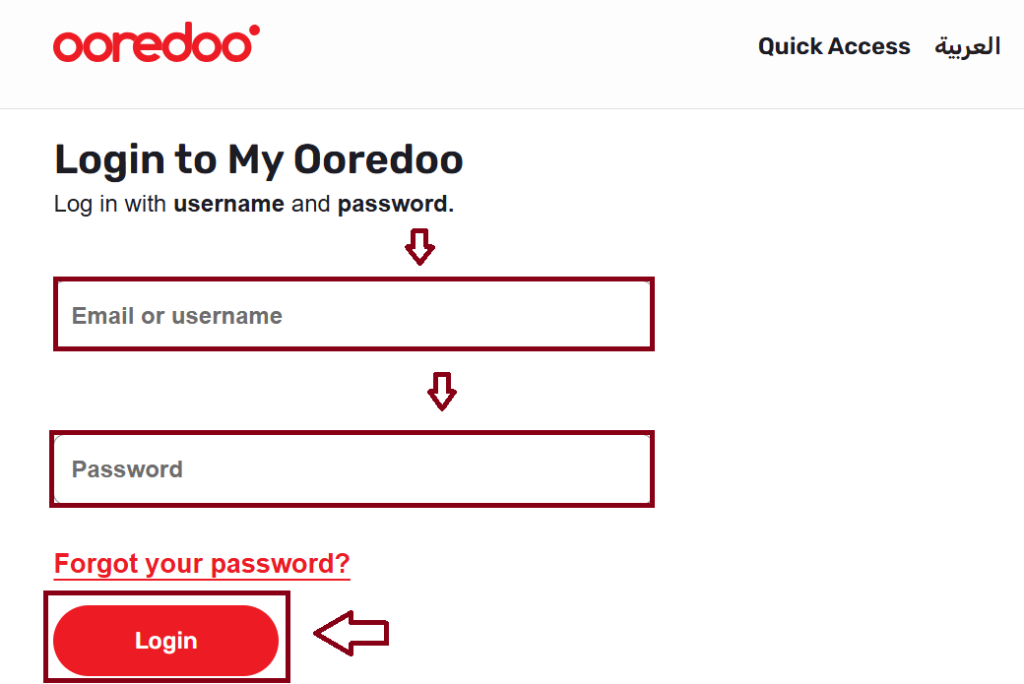
- Once logged in, your available balance will be displayed on the dashboard.
Check Ooredoo Qatar Balance Via Ooredoo App
- Download the Ooredoo Qatar App Google Play Store or App Store.


- Open the app and set the language to English.
- Sign in with your Ooredoo number and password.
- Go to the “Services” section.
- Tap on “Shahry Voice” or your active plan.
- View your data balance, remaining voice minutes, and expiry dates.
How to Check Ooredoo Qatar Balance via SMS
- Open the messaging app on your mobile.
- Type BAL SPE in the message body.
- Send it to 114.
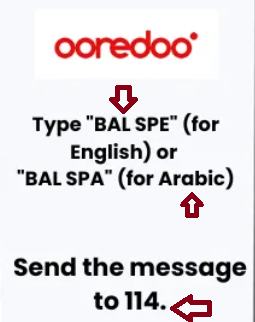
- You will receive an SMS with your current balance details.
How to Check Ooredoo Qatar Balance via USSD Code
To check your balance using a USSD code:
- Open the phone dialer on your mobile.
- Dial
*129#. - You will receive a message showing your main balance and validity period.
Ooredoo Data Balance Check via Customer Service
- To check your Ooredoo data balance, follow these steps:
- Save Ooredoo’s WhatsApp number (4414 4414) to your contacts.
- Open WhatsApp and send a message with your inquiry.
- Alternatively, call 111 from your Ooredoo number to speak directly with a customer service representative.
Ooredoo Qatar Postpaid Balance Check
- USSD Code: Dial
*123#to view balance and plan details. - Ooredoo Mobile App: Check current balance, remaining data, and plan validity.
- Customer Care: Call 111 (Ooredoo) or 800 7111 (other numbers) for assistance.
- Website: Log in to the Ooredoo Self-Service Portal to view balance and usage.
Ooredoo Qatar Flexi Balance Check
- USSD Code: Dial
*127#to check your Flexi points and balance. - SMS: Send your Flexi PIN to 127 to view remaining points.
- Ooredoo App / OM Wallet: Log in to see your Flexi balance and validity.
- Customer Care: Call 111 from your Ooredoo number for assistance.
Ooredoo Qatar Balance Check Numbers
- Prepaid / Postpaid Balance: Dial
*129#for prepaid or*123#for postpaid. - Flexi Balance: Dial
*127#. - Customer Care (for balance inquiries):
- From Ooredoo numbers: 111
- From other numbers in Qatar: 800 7111
- From abroad: +974 7700 7111
How to Check Ooredoo International Minutes Balance in Qatar
- USSD Code:
- Prepaid: Dial
*129#to view remaining international minutes. - Postpaid: Dial
*123#to check all plan allowances including international minutes.
- Prepaid: Dial
- Ooredoo Mobile App:
- Log in and view your plan details to see remaining international minutes.
- Customer Care:
- Call 111 (Ooredoo) or 800 7111 (other numbers) and ask for your international minutes balance.
- Website / Self-Service Portal:
- Log in to check your plan usage, including international minutes.
Ooredoo Qatar Bill Payment
Paying your Ooredoo Qatar postpaid bill is simple and convenient, with multiple options designed to suit everyone. Whether you prefer online payments, using the mobile app, visiting self-service machines, or paying through authorized retailers and banks, Ooredoo ensures your bills are settled quickly and securely.
Bill Payment Options:
- Online via Ooredoo Website: Pay using debit/credit cards or OM Wallet.
- Ooredoo Mobile App / OM Wallet: Quick bill payment via smartphone with multiple payment methods.
- Self-Service Machines (SSM): Pay in-store using cash, card, or OM Wallet.
- Authorized Retailers / Banks: Pay at selected supermarkets, convenience stores, or partner banks.
- ATM / Bank Transfers: Some banks like QNB allow direct bill payment via ATM or online banking.
- Customer Care: Call 111 from your Ooredoo number for assisted bill payment.
Ooredoo Qatar Bill Payment Online
- Visit the Ooredoo Self-Service Portal: Go to the official Ooredoo website and access the Self-Service Portal.
- Log In: Enter your registered email or Ooredoo number and password.
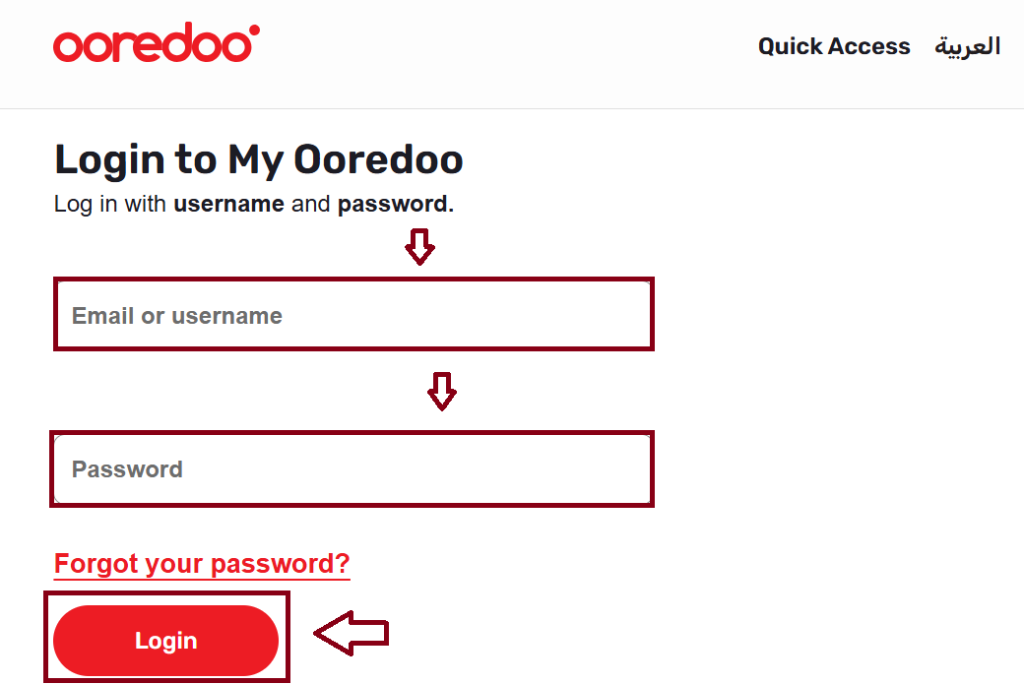
- Navigate to Bill Payment: Click on the “Bill Payment” or “Pay Bill” option in your dashboard.
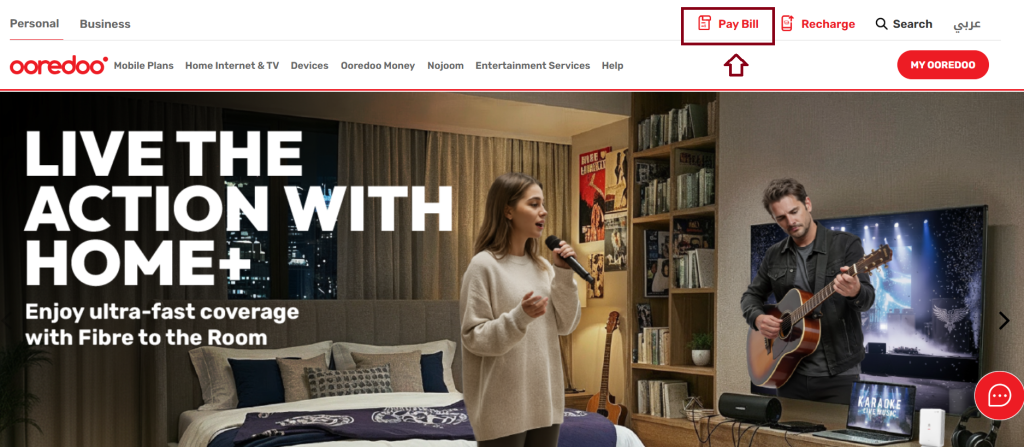
- Select Payment Method: Choose from credit/debit card, Google Pay, or OM Wallet.
- Confirm Payment: Review the details and finalize your payment.
- Receive Confirmation: A message or notification will confirm your bill payment.
Ooredoo Qatar Bill Payment Via Ooredoo App
- Download the App: Get the Ooredoo Qatar App from Google Play Store or Apple App Store.


- Log In: Open the app and sign in with your Ooredoo number and password.
- Go to Bill Payment: Navigate to the “Bill Payment” or “Pay Bill” section.
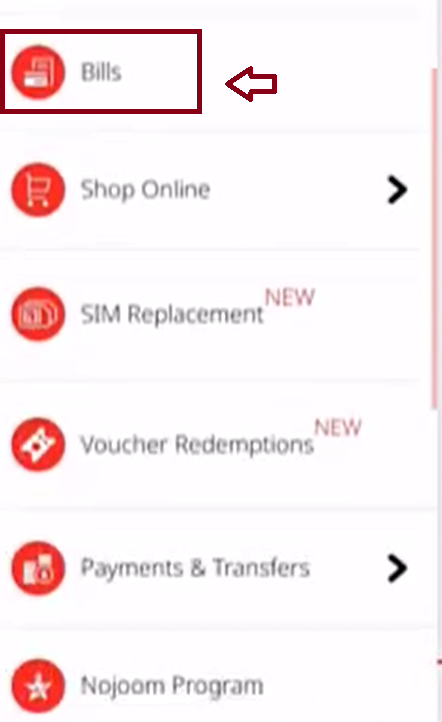
- Select Payment Method: Choose credit/debit card, Google Pay, or OM Wallet as your payment option.
- Confirm Payment: Review your bill details and confirm the payment.
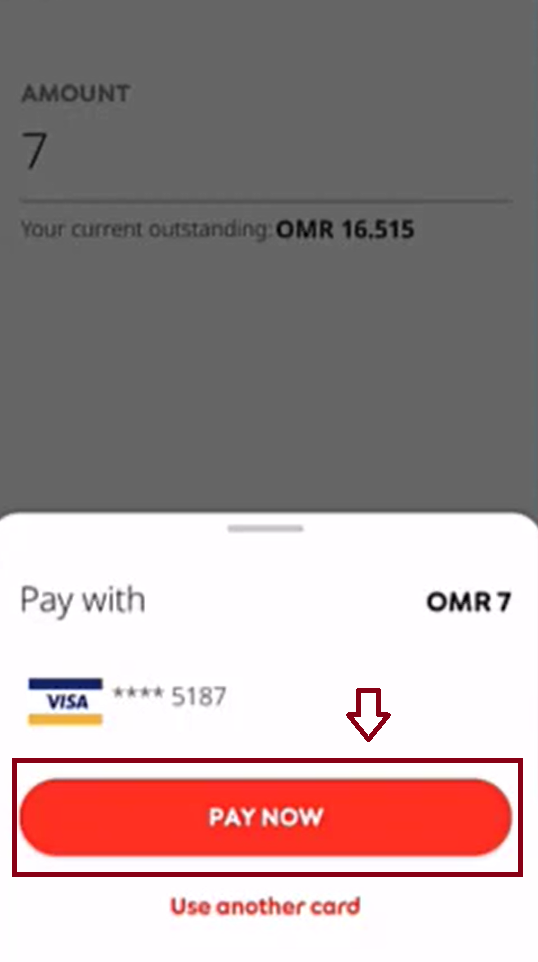
- Receive Confirmation: You will get a notification or confirmation message once the payment is successful.
Ooredoo Qatar Bill Payment via Self-Service Machines
You can pay your Ooredoo postpaid bill at Self-Service Machines (SSM) located in Ooredoo stores and other public areas.
- Locate an SSM: Find an Ooredoo Self-Service Machine in stores or public locations.
- Enter Mobile Number / Swipe SIM: Input your Ooredoo number or swipe your SIM card.
- Select Bill Payment: Choose the “Bill Payment” option on the screen.
- Choose Payment Method: Pay using cash, debit/credit card, or OM Wallet.
- Confirm Payment: Review the details and complete the transaction.
- Receive Receipt / Confirmation: The machine will display or print a confirmation of payment.
Ooredoo Qatar Bill Payment via Authorized Retailers
You can pay your Ooredoo postpaid bill at authorized retailers across Qatar.
- Find a Retailer: Locate an authorized Ooredoo retailer, such as supermarkets, convenience stores, or kiosks.
- Provide Your Details: Give your Ooredoo number and bill information to the cashier.
- Make Payment: Pay your bill using cash or card as accepted by the retailer.
- Receive Confirmation: Keep the receipt as proof of payment.
Ooredoo Qatar Bill Payment via Customer Care
You can pay your Ooredoo postpaid bill by contacting Ooredoo Customer Care.
- Call Customer Care: Dial 111 from your Ooredoo number or 800 7111 from other numbers in Qatar.
- Verify Account: Provide your Ooredoo number and any requested account details to the representative.
- Choose Payment Method: Pay using credit/debit card or other accepted payment options.
- Receive Confirmation: The representative will confirm your bill payment and provide a receipt or reference number.
How to Pay Ooredoo Qatar Bill with a Recharge Card
- Obtain a Recharge Card: Buy an Ooredoo recharge card from an authorized retailer or store.
- Scratch the Card: Remove the protective layer to reveal the 16-digit voucher code.
- Dial USSD Code: On your Ooredoo mobile, dial
*102*<16-digit code>#. - Follow On-Screen Instructions: Confirm the payment and choose to apply the credit toward your postpaid bill.
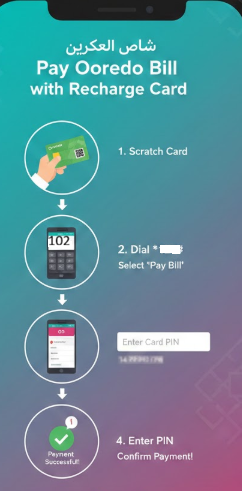
- Receive Confirmation: You will get a message confirming your bill has been paid using the recharge card.
Ooredoo Qatar Postpaid Bill Payment
- Online via Website: Pay through the Ooredoo Self-Service Portal using card, Google Pay, or OM Wallet.
- Ooredoo Mobile App / OM Wallet: Quick payment via smartphone with multiple payment methods.
- Self-Service Machines (SSM): Pay in-store using cash, card, or OM Wallet.
- Authorized Retailers / Banks: Pay at supermarkets, kiosks, or partner banks with cash or card.
- Customer Care: Call 111 (Ooredoo) or 800 7111 (other numbers) to pay via card.
- Recharge Card: Use a 16-digit voucher code to pay your bill directly.
Ooredoo Branches in Qatar
Here are the official Ooredoo branches across Qatar:
- Al Sadd Branch
- Al Wakrah Branch
- Sports City Branch
- Al-Nakheel Complex Branch
- Doha Branch (24/7 Service)
- Villaggio Mall Branch
- City Center Mall Branch
- Old Airport Road Branch
- Salwa Road Branch
Ooredoo Qatar Customer Care Number
- Email : [email protected]
- Visit Stores: Store Finder
Phone Numbers:
- General Inquiries / Other Operators in Qatar: +974 8001000/97444200700
- Call Centre: 111
- Directory Assistance: 180
- Ooredoo Main Line: +974 44 380 000
Corporate Address:
- Ooredoo Q.S.P.C, West Bay, PO Box 217, Doha, Qatar
- Phone: +974 44 400 400 | +974 44 476 231
FAQs About Ooredoo Qatar
How can I check my Ooredoo balance?
You can check your Ooredoo balance in Qatar either by dialing *129# from your Ooredoo number, which will instantly display your current balance, or by using the My Ooredoo App, where you can log in to view your balance along with other account details. Both methods are quick, convenient, and available anytime.
What is the customer service of Ooredoo Qatar?
Call at 800 8000 for dedicated business support. Our expert team is ready to assist you with any Ooredoo business service or concern.
How to check Ooredoo internet package?
To check your Ooredoo data package, the easiest ways are using the Ooredoo App, dialing a specific USSD code (like *129# or *102# depending on your country/plan), sending an SMS (e.g., “BAL SPE” to 114 in Qatar), contacting Customer Care (dial 111 in Qatar), or using WhatsApp for support.
Can I pay my Ooredoo bill through the app?
Yes, you can easily pay your Ooredoo Qatar bill through the Ooredoo App. Simply log in, go to the Bill Payment section, select your payment method (card, Google Pay, or Ooredoo Money), and confirm the payment. A confirmation notification will be sent once the transaction is successful.
Conclusion
Ooredoo Qatar stands out as a comprehensive telecommunications provider, seamlessly combining advanced networks, innovative digital services, and customer-focused solutions. With diverse recharge options, robust postpaid and prepaid plans, and reliable support, it empowers individuals and businesses alike, driving connectivity, convenience, and digital transformation throughout Qatar.