
Get NOC From Metrash. In Qatar, a No Objection Certificate (NOC) is an essential document used in many legal and administrative procedures. It is commonly required for matters such as changing employment, processing residency permits, or confirming official consent from the concerned authority.
For both personal and business-related purposes, obtaining an NOC has become quick and convenient through Metrash, the official online platform that streamlines government services. In this guide, we’ll explain the step-by-step method to get an NOC from Metrash easily and without stress.
Note: This guide covers the general NOC process. If you are specifically looking for an NOC related to a driving license, please refer to the dedicated guide for that service.
What Is an NOC in Qatar?
A No Objection Certificate (NOC) is an official document issued by a relevant authority or sponsor confirming that they have no objection to a specific action. It is commonly required for the following purposes:
- Changing jobs or transferring sponsorship
- Buying or selling a vehicle
- Starting a business
- Traveling with dependents
This certificate helps ensure that the intended activity is legally permitted and approved by the concerned party.
Requirement of NOC
In Qatar, a No Objection Certificate (NOC) is generally not required when changing jobs. Despite this, some individuals still choose to obtain or purchase an NOC for various personal or procedural reasons.
Why Use the Metrash App for NOC?
The Metrash app, launched by Qatar’s Ministry of Interior, simplifies access to essential government services for both residents and citizens. It eliminates the need to visit offices or wait in long queues, allowing you to complete official tasks directly from your smartphone. One of its key features is the ability to apply for a No Objection Certificate (NOC) online. Through Metrash, you can submit your request, monitor its progress, and receive the NOC digitally—without paperwork. This makes the entire process fast, convenient, and highly efficient.
How To Get NOC From Metrash In Qatar?
Follow these easy steps to get your NOC using the Metrash mobile app:
Step 1: Download, Install, and Sign in to the Metrash App
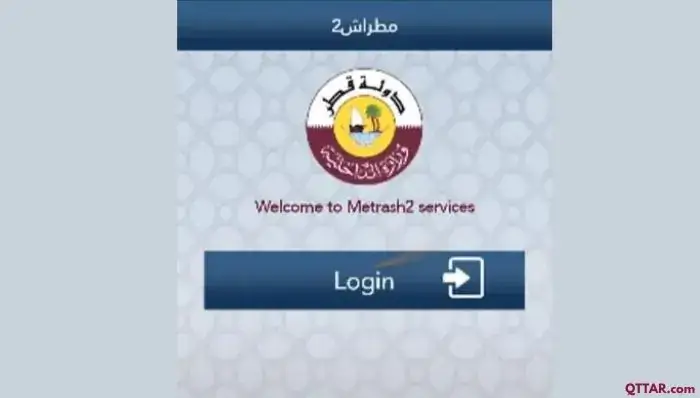
- Download and install the Metrash app on your mobile phone.
- If you don’t already have an account, sign up on Metrash2 using your Qatar ID (QID) and registered mobile number.
- Log in to the application with your credentials.
Step 2: Navigate to the “Visa” Section
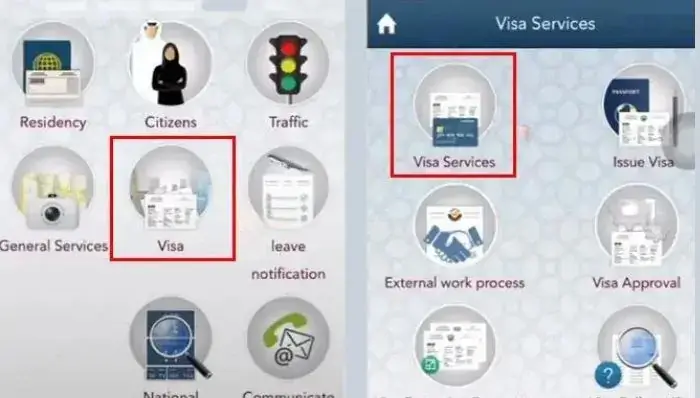
- After logging in successfully, select the “Visa” option from the main menu.
- Then, click on “Visa Services” to access all visa-related activities.
Step 3: Select “Issue NOC”
- Navigate to the Visa Services menu and locate the “Issue NOC” option.
- Click “Issue NOC” to start the NOC application process.
Step 4: Choose the NOC Type
Decide whether you need the NOC for Personal or Company purposes.
- Then, select the specific category of NOC you require, such as:
- Employment NOC
- Family Visa NOC
- Driving License NOC
- Vehicle Registration NOC
- Bank Account NOC
Step 5: Enter Your Qatar ID (QID) Number
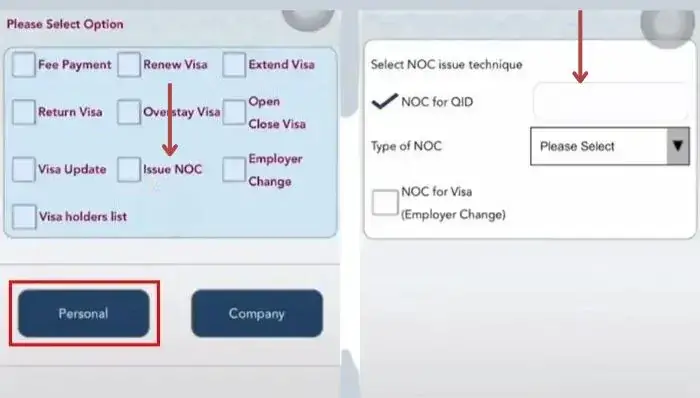
- Type your correct Qatar ID (QID) number to continue with the NOC application.
- Double-check the number you entered to prevent any errors or delays.
Step 6: Provide Additional Information
- Depending on the type of NOC you are applying for, you may need to submit extra details, such as:
- Employer information
- Job title and salary
- Family member details
- Vehicle information
- Bank account details
- Ensure that all information is accurate and up-to-date before proceeding.
Step 7: Review and Submit Your Request
- Carefully check all the information you entered and verify the selected options.
- Once everything is correct, submit your NOC request.
- You will receive a confirmation email once your submission is successful.
Step 8: Pay the NOC Fee (If Applicable)
- Some NOC types require a fee, which can be paid securely through the Metrash app using a credit or debit card.
- Follow the on-screen instructions to complete the payment process.
Step 9: Receive Your NOC
- After your NOC request is approved, you will receive a notification via the Metrash app and an email confirmation.
- The NOC can be downloaded from the “My Documents” section of the app.
- You can now use the NOC for its intended purpose, such as a job transfer, visa application, or other relevant processes.
Validity and Fee of Qatar NOC
- The validity and cost of a Qatar No Objection Certificate (NOC) depend on the type of NOC and the purpose for which it is issued. Key points to consider include:
- The validity period of a Qatar NOC is defined at the time of issuance; however, it does not have a fixed expiry date.
- Each NOC is valid for a single transfer and cannot be reused for multiple purposes.
- The fee for obtaining a NOC varies according to its type and is typically paid by the employer or sponsor.
- In certain cases, the NOC fee may be waived or reduced, especially for low-income workers or applicants experiencing financial hardship.
- It is important to stay updated on the latest rules and regulations regarding NOC validity and fees by consulting the Ministry of Interior (MOI) or the Ministry of Administrative Development, Labour and Social Affairs (MADLSA).
Qatar NOC Format
Since 2020, Qatar has removed the strict requirement for workers to obtain a No Objection Certificate (NOC) when changing jobs or sponsors. This reform gives employees the freedom to switch employers without seeking approval from their current sponsor, as long as they fulfill certain conditions, such as completing their contract or providing proper notice.
Although the traditional Qatar NOC format is no longer needed in most employment transfer cases, obtaining an NOC remains important for specific purposes. These include applying for family visas, registering vehicles, or other official processes where the consent of the employer or sponsor is still required.
How to Track the Status of Your NOC in Qatar via Metrash
Checking the status of your NOC application in Qatar is simple with the Metrash app. Just log in and navigate to the “My Requests” section to see the latest updates on your application.
- If your NOC status is not visible, or if your application was submitted through your employer, you can:
- Contact your sponsor or employer for an update.
- Call the MOI helpline at 2342000 for direct assistance.
FAQs About NOC From Metrash In Qatar
What Documents Are Required to Apply for a Qatar NOC via Metrash?
- To apply for a Qatar NOC through Metrash, you generally need the following documents:
- Qatar ID (your valid QID)
- Employment contract or relevant company documents
- Request letter (in some cases, depending on the NOC’s purpose)
How Long Does It Take to Receive a Qatar NOC from Metrash?
The processing time for a Qatar NOC usually takes a few working days. However, the exact duration may vary depending on the type of NOC and the internal approval procedures of the issuing authority.
Can I Track the Status of My Qatar NOC Application?
Yes, you can track your NOC application status easily through the Metrash2 app. Alternatively, you can also follow up directly with the relevant department or your employer/company managing the NOC request.
Can One Qatar NOC Be Used for Multiple Purposes?
No, Qatar NOCs are generally purpose-specific. For example, an NOC issued for a job transfer cannot be used for travel or licensing. If you require NOCs for different purposes, you must apply for each separately.
Conclusion
In Qatar, obtaining a No Objection Certificate (NOC) has become simple and efficient through the Metrash app, allowing residents to complete official procedures without visiting offices. While NOCs are purpose-specific and may involve fees, they ensure legal compliance for activities like job transfers, visa applications, or vehicle registration. By following the step-by-step Metrash process, applicants can quickly request, track, and receive their NOC digitally, saving time and avoiding unnecessary hassle.