
Change Mobile Number In Metrash. Metrash is an official mobile application launched by Qatar’s Ministry of Interior (MOI) that enables residents to access a wide range of government services directly from their smartphones. From renewing a Qatar ID to checking traffic violations, it simplifies everyday administrative tasks.
To avoid service disruptions, it is essential to keep your registered mobile number in Metrash updated. Many services rely on this number to send verification codes and important notifications, and an outdated SIM may block access or delay transactions.
Why Your Mobile Number Matters
The Metrash mobile app, developed by Qatar’s Ministry of Interior (MOI), is a key digital platform that gives residents and citizens access to more than 400 government services. Your registered mobile number is essential because it:
- Receives verification codes for completing transactions
- Sends alerts about traffic violations and fines
- Notifies you of visa and residency permit expiry dates
- Provides updates on application and request statuses
- Delivers important security-related notifications
If your mobile number is not accurate or up to date, access to these services can be disrupted. Many users are unaware that changing a SIM card or phone requires manually updating the registered number in their Metrash account to continue using the app without issues.
Steps to Change Mobile Number in Metrash
Follow these easy steps to update your mobile number on the MOI Qatar Metrash platform:
Step 1: Access the MOI Website
Open your web browser and visit the official Ministry of Interior (MOI) Qatar website.
Step 2: Select the “Inquiries” Option
On the homepage, find and click the “Inquiries” icon to access the range of inquiry services offered by the Ministry.
Step 3: Open the Metrash Page
Under the “Inquiries” section, go to the Metrash page, where all services related to the Metrash mobile application are listed.
Step 4: Select “Metrash for Individuals”
Click on “Metrash for Individuals” to access services specifically designed for individual users.
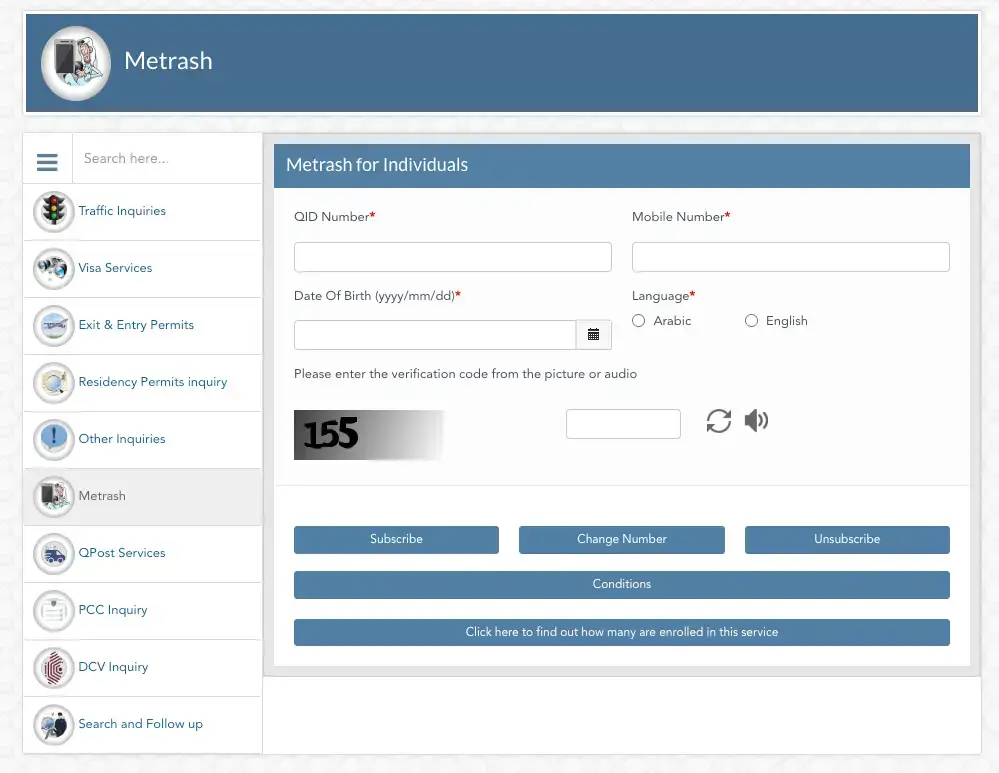
Step 5: Enter Your QID and Updated Mobile Number
On the Metrash for Individuals page, enter your Qatar ID (QID) number, date of birth, preferred language, and the new mobile number you want to register.
Step 6: Select Language and Complete CAPTCHA Verification
Choose your preferred language from the available options, then enter the CAPTCHA code shown on the screen to complete the security verification and confirm you are not a robot.
Step 7: Select “Change Number”
After filling in all the required details, click the “Change Number” button to submit your request.
That’s all. Your request to update your mobile number in Metrash has been successfully submitted. You can also use this same page to subscribe to or unsubscribe from other services available on Metrash.
Changing Mobile Number Through the MOI Website
The most dependable way to update your Metrash mobile number is through the official Ministry of Interior (MOI) website. This method is especially useful if you cannot access the Metrash app due to phone loss, damage, or technical issues.
Step 1: Visit the MOI Website
- Open your web browser and go to the official MOI website at www.moi.gov.qa.
- The website supports both Arabic and English, so choose the language you are most comfortable with.
Step 2: Access the Inquiries Section
- On the homepage, locate and click on the “Inquiries” tab or icon.
- This section lists various online services offered by the Ministry of Interior. Select it to continue with the process.
Step 3: Select Metrash Services
Under the Inquiries section, you will find several Ministry of Interior (MOI) service options. From the list, select “Metrash.” You will then be redirected to the Metrash services page.
Step 4: Choose “Metrash for Individuals”
On the Metrash services page, multiple categories will appear. Select “Metrash for Individuals.” This option is intended for personal Metrash accounts, not business or other services.
Step 5: Enter Your Details
Complete the required information by entering:
- Your Qatar ID (QID) number
- Your new mobile number (include the country code +974)
- Your preferred language from the dropdown menu
- The captcha verification code displayed on the screen
Step 6: Submit Your Request
Carefully review all the information you’ve entered to ensure it is accurate. Once confirmed, click the “Change Number” button. The system will process your request instantly.
Step 7: Confirmation
After successful submission, a confirmation message will appear, and your registered mobile number will be updated in the system. The entire process usually takes less than five minutes. You may need to log out and log back into the Metrash app for the changes to take effect.
Common Reasons to Update Your Metrash Mobile Number
There are several situations that may require you to change your registered phone number in the Metrash app:
- You’ve switched to a new mobile carrier for better rates or coverage.
- Your SIM card was lost or damaged, necessitating a replacement.
- You initially registered with an incorrect phone number.
- Your phone was stolen or lost, and you now have a new number.
- You’re using a different device for convenience or security reasons.
- Your company issued a new corporate number that must be used.
Fortunately, the Qatar Ministry of Interior has made the update process simple, providing multiple options to change your number quickly and securely.
Requirements to Change Mobile Number in Metrash
To update your mobile number in Qatar’s Metrash system, have your Qatar ID (QID) and new active number ready. Then, log in to the MOI Qatar portal or the Metrash2 app, go to “Inquiries” or Metrash Services, enter your QID and new number, select your language, complete the CAPTCHA, and confirm the change via the SMS sent to your new number.
How To Fix Metrash Mobile Number Change Issues
- To update your mobile number in Metrash, use the MOI website (moi.gov.qa) or the Metrash app.
- Enter your QID and new number, complete the verification (captcha/OTP), and confirm the change.
- If you encounter a “Request Failed” error, make sure your SIM is registered to your QID at an Ooredoo or Vodafone store, or contact MOI support at 2342000 for technical issues, including login problems.
Can You Use Metrash Without Updating Mobile Number?
Yes, Metrash can now be used for family members, such as a spouse or children, even if they don’t have their own linked mobile number. A new Ministry of Interior (MoI) feature allows primary users to authorize access and register dependents using their own details or a designated number. This delegation feature lets you add wives and children directly through the Metrash app, even when their QIDs aren’t linked to a phone.
Tips to Avoid Future Metrash Mobile Number Issues
- Make sure your SIM is registered to your QID at an Ooredoo or Vodafone store.
- Download the official Metrash app only from trusted app stores (Google Play or Apple App Store).
- Keep your registered mobile number updated via the MOI website or by calling 2342000.
- Use your QID and PIN correctly when logging into the app.
- If you encounter issues such as “Request Failed”, contact MOI support:
- 109 if calling within Qatar
- 2342000 if calling from outside Qatar
How can I change my mobile number in Metrash (2026)?
You can update your mobile number in Metrash using the official MOI Qatar website or the Metrash app. Simply enter your Qatar ID (QID), new mobile number, select your language, complete the CAPTCHA, and submit the request. A confirmation SMS will be sent to your new number.
Can I change my Metrash number if I lost my old SIM?
Yes. Even if your old SIM is lost or inactive, you can update your number via the MOI website. Make sure your new SIM is registered under your QID at an Ooredoo or Vodafone store before submitting the change.
What are the requirements to change my mobile number in Metrash?
To update your mobile number, you need:
- A valid Qatar ID (QID)
- An active Qatar mobile number
- Access to the Metrash app or MOI website
- Internet connection and CAPTCHA verification
Why is it important to keep my Metrash mobile number updated?
- Your registered mobile number is used for:
- Receiving verification codes
- Alerts about traffic violations and fines
- Notifications for visa and residency expiry
- Updates on applications and requests
Failing to update may result in service delays or access issues.
What should I do if my Metrash number change request fails?
If your request fails:
- Ensure your SIM is registered under your QID
- Check your internet connection
- Retry after updating the Metrash app
- Contact MOI support: 109 (within Qatar) or +974 2342000 (outside Qatar)
Conclusion
Metrash, Qatar’s official MOI app, simplifies access to over 400 government services, from ID renewal to traffic fines. Keeping your registered mobile number updated is essential for receiving verification codes, alerts, and notifications. Changing your number through the MOI website or Metrash app is quick and secure. Ensure your SIM is linked to your QID and follow proper verification steps to avoid service disruptions and maintain uninterrupted access.