
How To Get an NOC for a Driving License In Qatar? For many residents, the No Objection Certificate (NOC) is the first and most important step toward obtaining a driving license. Issued digitally through Qatar’s Ministry of Interior system, this approval confirms that your sponsor has no objection to you applying for a license. To release a vehicle after an accident or obtain a driving license, a valid No Objection Certificate (NOC) is required. Understanding how to get the NOC, who must apply for it, and which platform to use can save you time and prevent unnecessary delays.
What is NOC For Driving License in Qatar?
A No Objection Certificate (NOC) for a driving license in Qatar is an official approval given by your sponsor (employer or individual sponsor) confirming that they have no objection to you applying for and obtaining a driving license in the country. For most expatriate residents, this NOC is mandatory before starting the driving license process.
When Do You Need an NOC in Qatar?
- Family Visa Applications: To sponsor your spouse, children, or parents.
- Driving License Applications: To start the process of obtaining a Qatar driving license.
- Vehicle Registration: When buying and registering a vehicle in your name.
- Opening Bank Accounts: Certain banks may request an NOC for specific account types.
- Educational Enrollments: To register dependents in selected schools.
- Exit Permits: For temporary travel outside Qatar in certain cases.
- Business Activities: To launch side businesses or engage in commercial ventures.
How To Get NOC For Driving License In Qatar
You can apply for an NOC for a driving license here; these are the simple and easy methods.
Method 1: MOI Portal
Getting NOC from the Moi portal: here are the steps.
Step 1: Go to the MOI Website
- Open your web browser and visit the Ministry of Interior (MOI) E-Services page.
Step 2: Navigate to Traffic Services
- On the MOI portal, locate and click on the “Traffic Services” section to access driving license-related services.
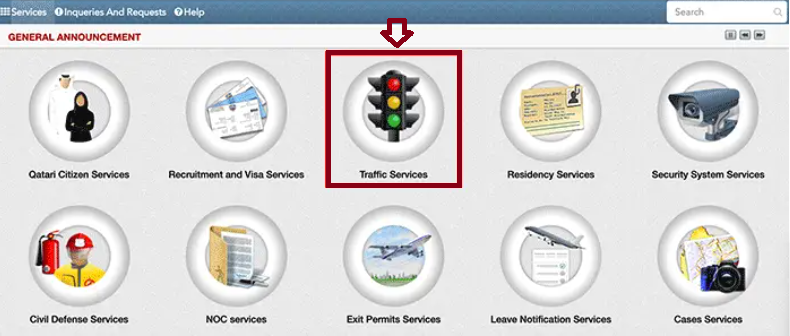
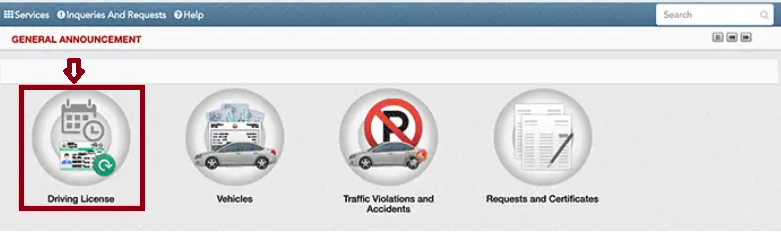
Step 3: Access the “Driving License
- In the traffic services menu, locate and click on the “Driving License” option.
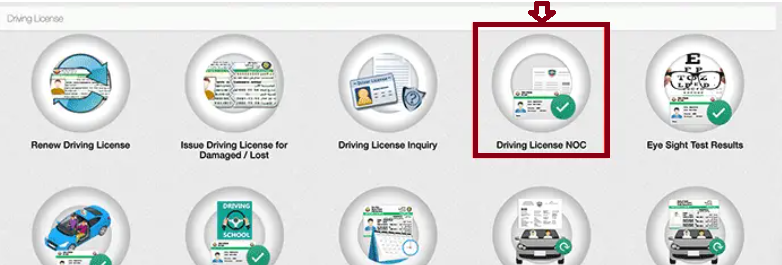
Step 4: Choose Driving License NOC
- From the list of driving license services, select “Driving License NOC” to proceed with your request.
Step 5: Fill in the Required Information
- Complete all the mandatory fields in the NOC application form. Make sure the information provided is accurate to prevent any delays in processing.
Step 6: Submit the Application
- After reviewing the details, submit the NOC application. Once submitted, your sponsor will receive a notification when the NOC is approved. Keep track of any updates on the application status to stay informed.
Method 2: Metrash APP
You can apply for NOC via the metrash app. Here are the simple and easy steps.
Step 1: Download and Install the Metrash App
- Download and install the official MOI Metrash application from the Apple App Store (iOS) or Google Play Store (Android).


Step 2: Log In to Metrash APP
- Log in using your QID number and password. Use fingerprint or facial recognition if previously enabled
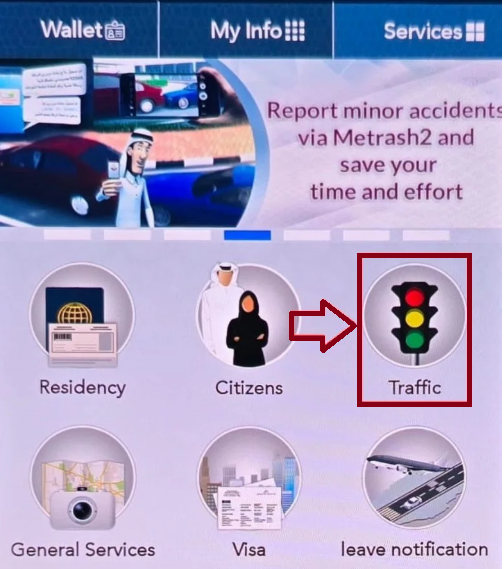
Step 3: Open the “Traffic” Option
- From the home screen, tap traffic in the main menu.
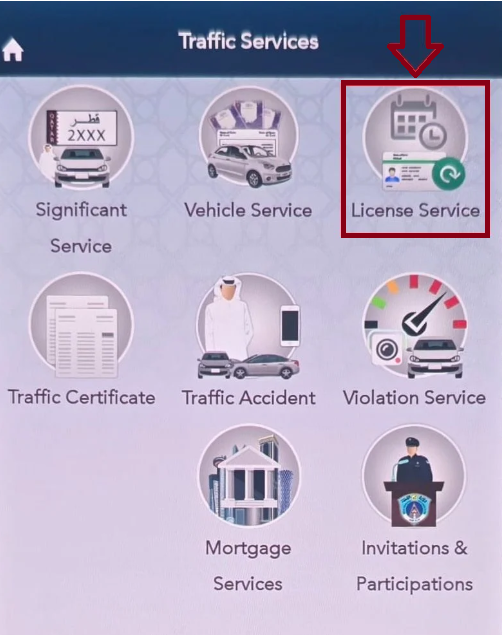
Step 4: Select the “License Service.”
- Scroll through the Traffic Services menu. Tap License Service to start the application.
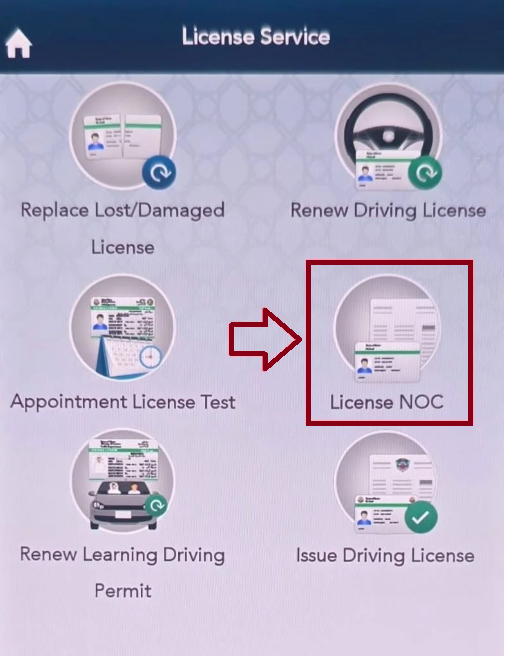
Step 5: Choose the License NOC
- Choose the NOC that matches your purpose, such as: Driving License NOC
Step 6: Enter Required Details
- Enter the Qatar ID (QID) of the person requesting the NOC, according to the vehicle.
Step 7: Review and Confirm Information
- Carefully review all entered details Make corrections if necessary. Ensure all information matches official documents.
Step 8: Submit the NOC Application
- Tap Submit or Confirm. The system will verify and process your request. A confirmation message will appear once submission is successful
Step 9: Pay Fees (If Applicable)
- Some NOC types require government fees. Complete payment using a credit or debit card Bank transfer Save the payment confirmation for reference.
Step 10: Download Your Approved NOC
- Once approved, you’ll receive a notification via Metrash and SMS
- Go to My Documents or My Requests. Download and save your digital NOC
- Print a copy if a physical submission is required.
NOC For Driving License in Qatar Processing Time
In Qatar, obtaining an NOC for a driving license is usually a fast process and is often handled online through the Ministry of Interior (MOI) portal. The sponsor logs in, submits the request using the applicant’s QID, and once approved, typically within a few days, often around 3 to 7 working days, the NOC is verified online, allowing the applicant to move forward with the driving license application.
NOC For Driving License in Qatar Fee & Validity
The validity period and any applicable fees for a Qatar NOC depend on the type of NOC and the purpose for which it is issued. Key points to remember include:
- The validity details are mentioned at the time of issuance, and in most cases, the NOC does not carry a fixed expiry date.
- A Qatar NOC is issued for one-time use only and cannot be reused for multiple applications or transfers.
Benefits Of NOC For Driving License in Qatar
- Allows License Application: It is a mandatory requirement for the Traffic Department to accept and process a driving license application for sponsored residents.
- Official Sponsor Consent: Confirms formal approval from your sponsor (company or individual) to obtain a driving license.
- Easy Online Access: Can be conveniently requested through the MOI e-portal or the Metrash2 app using Smart Card login, reducing the need for in-person visits.
- Fast Digital Approval: Uses a streamlined digital system that speeds up verification and overall license processing.
FAQs About NOC For Driving License in Qatar
Is an NOC required for a driving license in Qatar?
A No Objection Certificate (NOC) is a legal requirement for various procedures in Qatar. Whether you’re transferring business ownership, releasing an accident-involved vehicle, or applying for a driving license, an NOC is mandatory. The good news is that you can conveniently apply for an NOC online through the Ministry of Interior (MOI) portal.
What is the meaning of NOC in license?
A No Objection Certificate (NOC) is an official document confirming that an individual, organization, or authority has no objections to the matters outlined in it. It formally indicates that the issuing party grants approval for specific actions, transactions, or agreements without any reservations or restrictions.
How to get an NOC for a driving license in Qatar?
Log in to the MOI website and navigate to Traffic Services, then select Driving License NOC. In the Request Details section, enter the required NOC information. If the request is for a sponsored individual, provide their QID or visa number. Finally, select the appropriate driving license category, such as motorbike, bus, or car.
Conclusion
Obtaining an NOC for a driving license in Qatar is a straightforward yet essential step for expatriates. With online options through MOI and Metrash, the process is efficient, transparent, and crucial for legally starting your driving journey.