
How To Change Passport Number in Qatar ID? Updating your passport number in your Qatar ID (QID) is essential whenever you renew your passport or receive a new one. Ensuring that your QID reflects the correct passport details helps avoid travel, visa, and residency issues. This guide explains the official procedure for changing your passport number in QID in 2026, step by step.
Why Do You Update Your Passport Number On Your QID?
Updating the passport number on your Qatar ID is essential because your QID is electronically linked to your passport across government systems. Any mismatch can lead to serious problems, including immigration delays, banking restrictions, residence permit renewal issues, and disruptions to key government services. As every new passport is issued with a different number.
Required Documents For Changing Passport Number In QID
Once these documents are ready, you can proceed with the available methods to update your QID.
- Qatar ID (QID): The main identification document where the new passport number will be updated.
- Old Passport: A copy of the bio-data page showing the previous passport number.
- New Passport: A copy of the bio-data page of the newly issued passport.
How To Change Passport Number in Qatar ID
If you change your passport number in Qatar ID, here are the methods.
Method 1: Change Your Passport Number Via The MOI Online Portal
The Ministry of Interior (MOI) provides an online portal that allows residents to conveniently update their passport number linked to their Qatar ID. Follow the steps below to complete the update through the MOI portal.
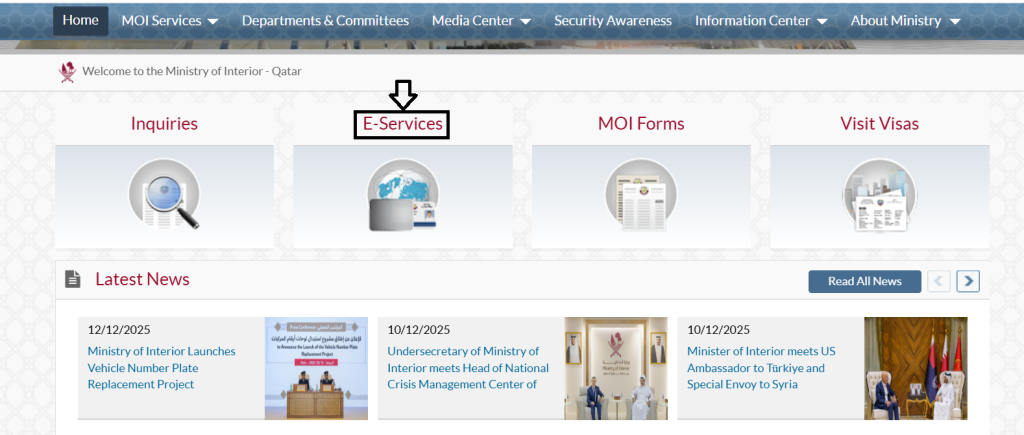
Step 1: Access the MOI Portal
- Visit the Official MOI portal and select the E-Services.
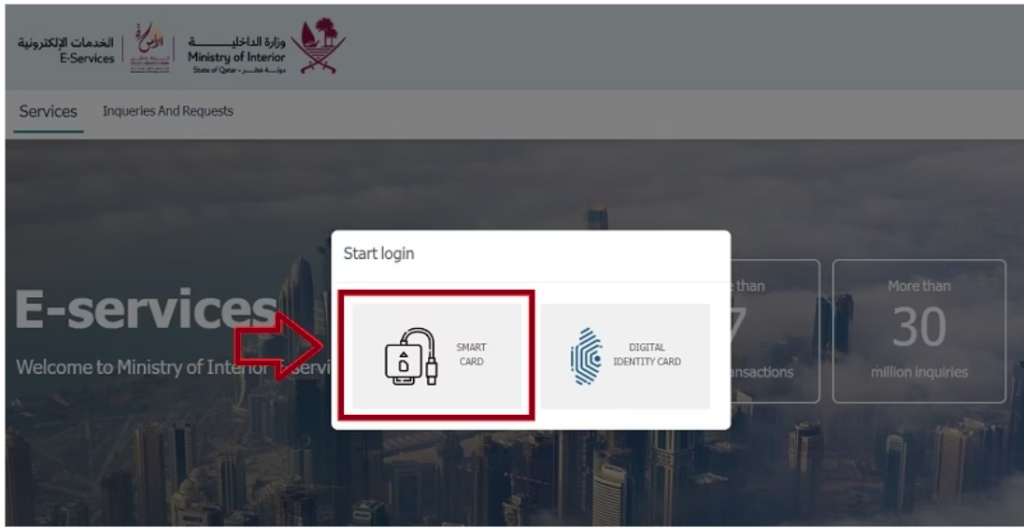
Step 2: Log In Using Your Smart Card
- Insert your Qatar Smart ID Card into a smart card reader and log in to the portal to continue.
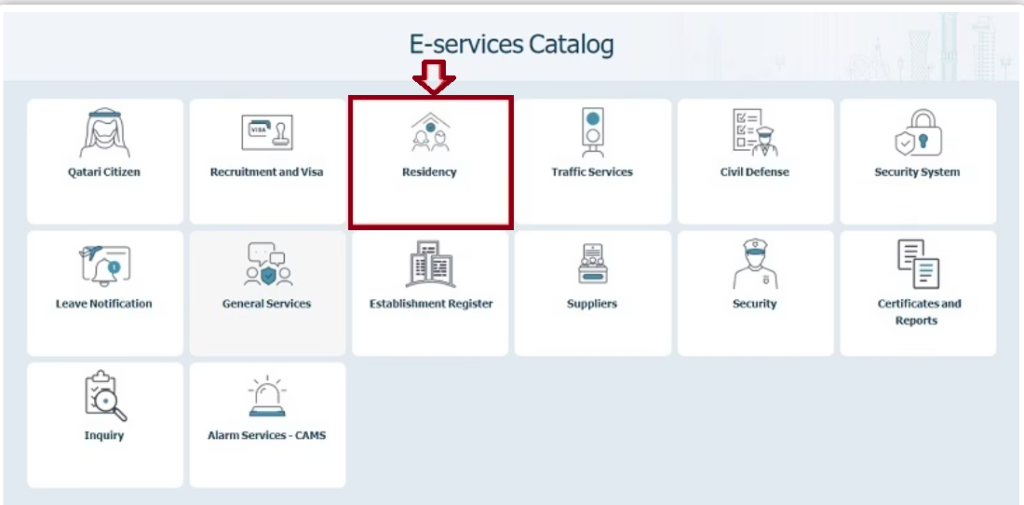
Step 3: Choose Residency Services
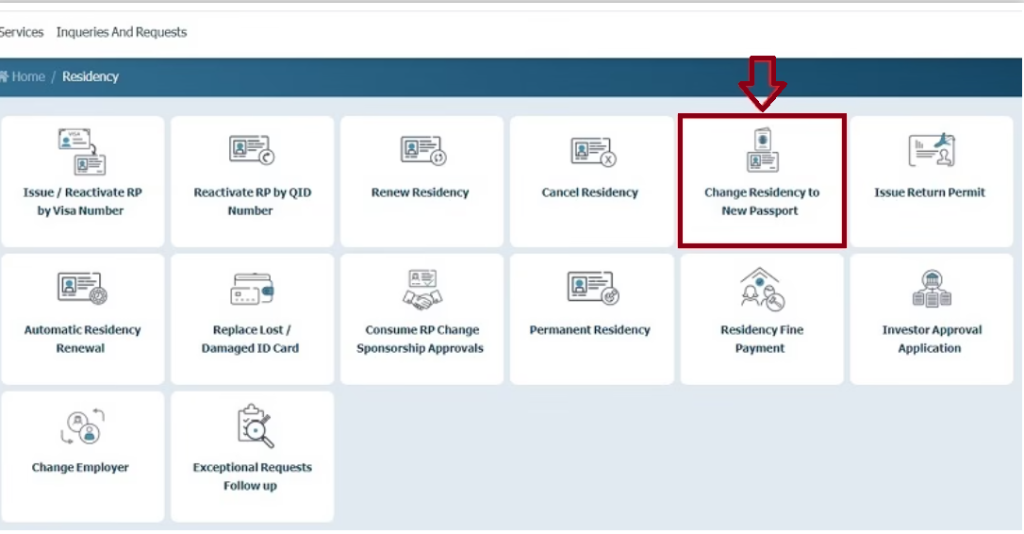
- After logging in, navigate to the menu and select “Residency Services.”
Step 4: Select “Change Residency to New Passport.”
- Click on the option “Change Residency to New Passport” to proceed.
Step 5: Enter Your QID Number
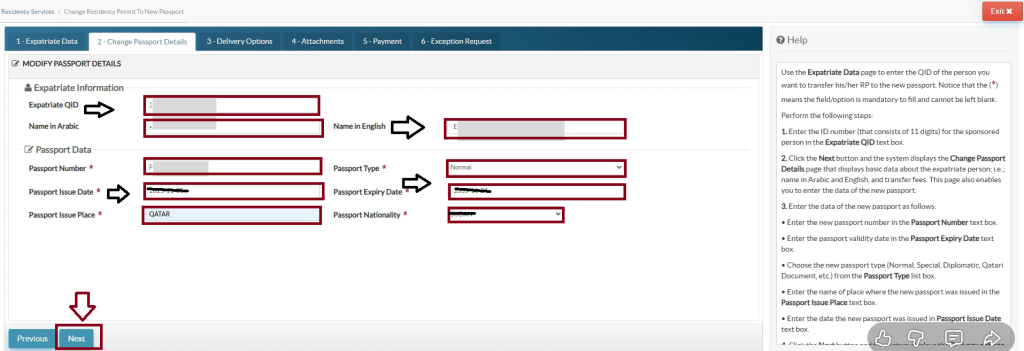
- Input your Qatar ID number in the designated field.
Step 6: Provide New Passport Details
- Fill in all necessary information from your new passport, including the passport number, issue date, expiry date, and place of issue.
- Select the reason for updating your passport number, such as expiration, loss, or damage.
- Choose passport nationality, then click on the Next option.
Step 8: Select Delivery Method
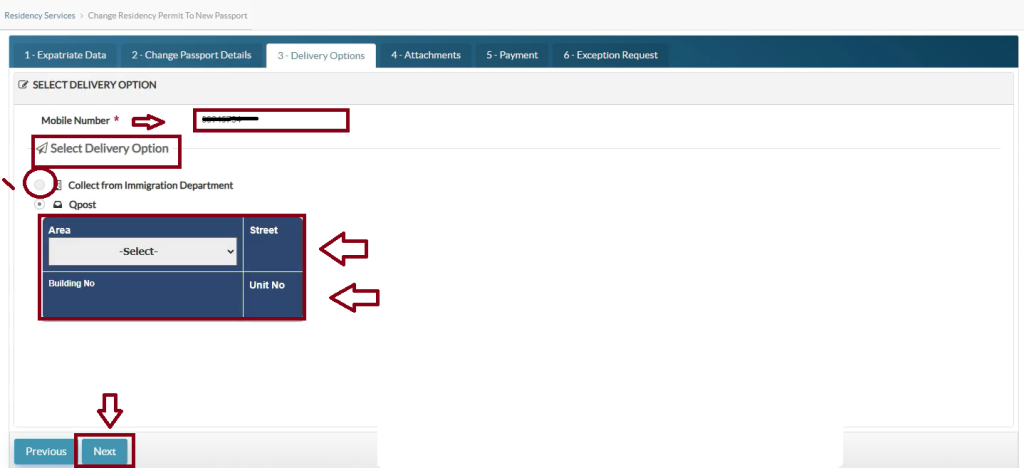
- Enter the mobile number.
- Choose how you want to receive your updated QID. You can either collect it from an MOI service center or have it delivered to your home via QPost for an additional QR 20.
- Input the area, street number, and building number.
- Click on the next option.
Step 9: Upload Passport Copies
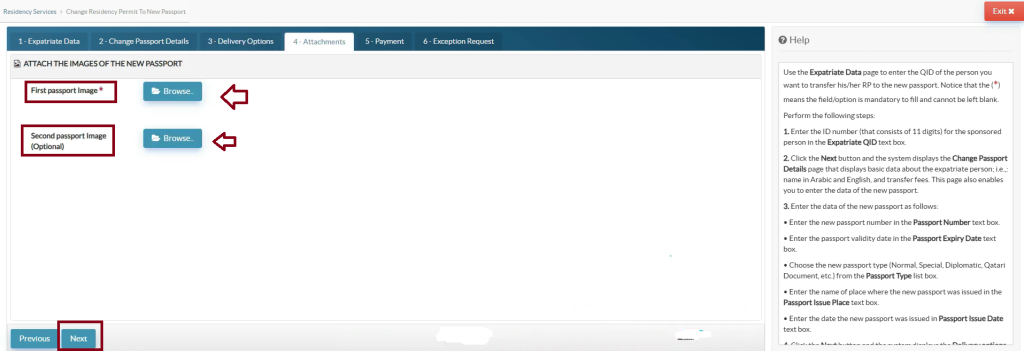
- Attach clear digital scans or photos of the main first and second pages of your passport.
- Click on the next option.
Step 10: Make the Payment
- Complete the payment using a debit or credit card.
- Click on the pay option.
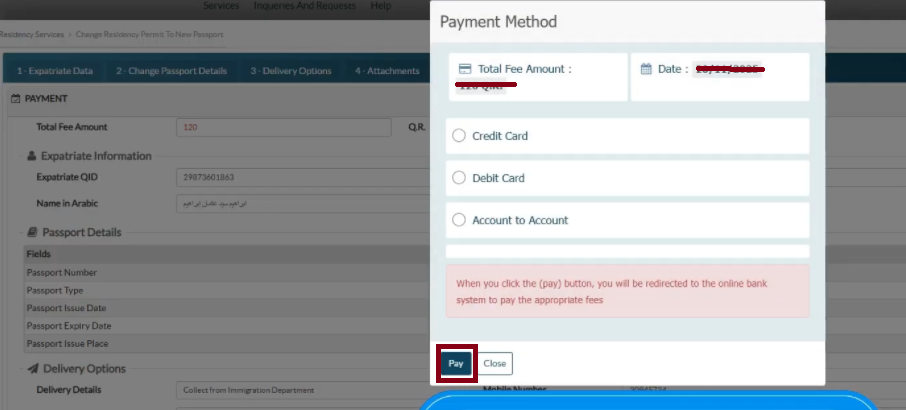
Step 11: Save or Print the Receipt
- After the payment is processed, save a digital copy or print the receipt for your records.
Method 2: Change Passport Details via the Metrash App
The Metrash app provides a convenient way to update your Qatar ID passport number directly from your mobile device. Follow these simple steps to complete the process:
Step 1: Log In to Metrash App
- Open the Metrash2 app and log in using your account.
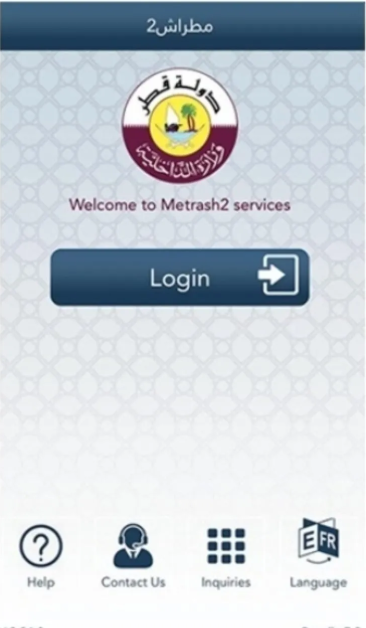
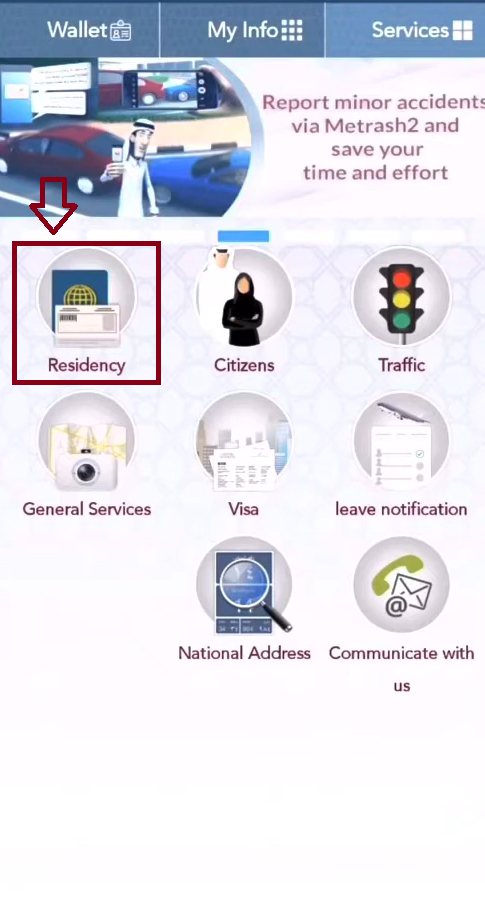
Step 2: Access Residency Services
- From the home screen, tap on the “Residency” option.
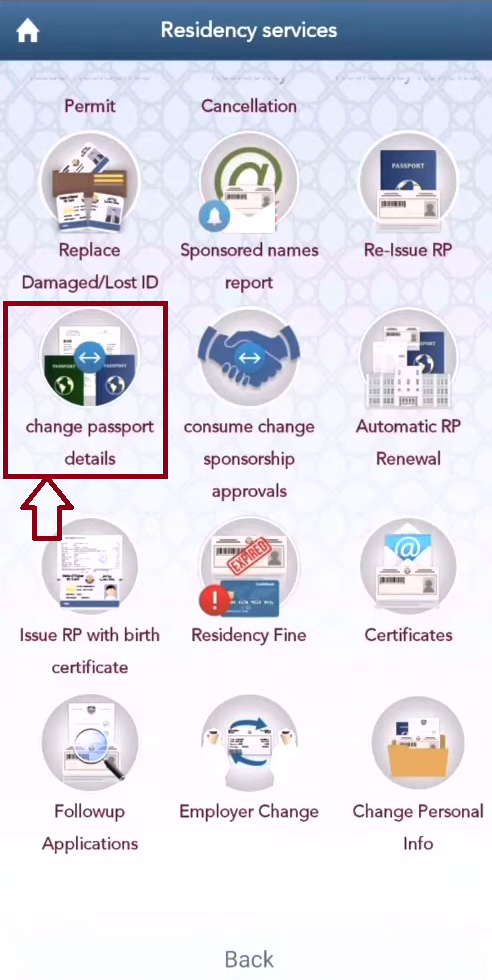
Step 3: Select “Change Passport Details.”
- Tap on “Change Passport Details” to begin the update process.
Step 4: Enter Your QID Number
- Input your Qatar ID number and click “Next.”

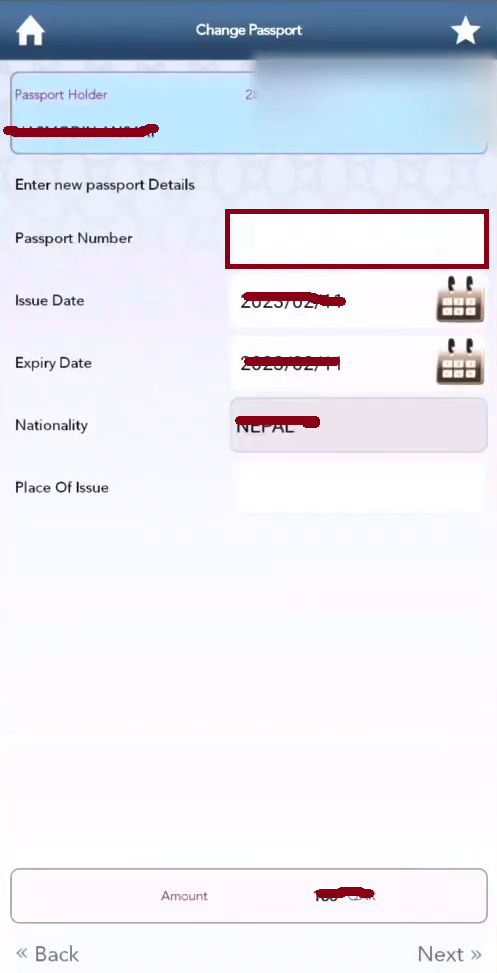
Step 5: Provide New Passport Details
- Enter the information from your new passport, including the passport number, issue date, expiry date, and nationality.
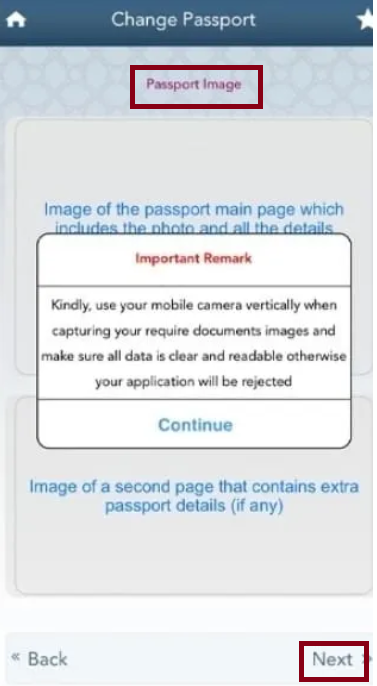
Step 6: Upload Passport Photos
- Attach clear and legible photos of your new passport’s bio-data pages.
- Click on the Next option.
Step 7: Choose Delivery Option
- Select whether you want to collect the updated QID from an MOI service center or have it delivered to your home via QPost for an extra QR 20.
Step 8: Make the Payment
- Complete the payment using your debit or credit card.
Step 9: Receive Your Updated QID
- After payment, your updated Qatar ID will be delivered through your chosen method.
Method 3: In-Person Changing Passport Number at MOI Service Center
Even with Qatar’s advanced digital services, visiting an MOI Service Center in person can often be the most effective option. This is especially true for those who prefer face-to-face assistance, do not have access to the Metrash app or the MOI portal, are dealing with a complex situation that requires personal explanation, or simply want to receive their updated Qatar ID immediately.
Step 1: Visit the Nearest MOI Service Center
Service centers are generally open Sunday to Thursday, 7:00 AM to 1:00 PM. To avoid long queues, try arriving early or around 10:30 AM, when it’s usually less busy.
Step 2: Take a Service Token
Upon arrival, get a token from the reception desk and specify that you want to update passport details on your Qatar ID.
Step 3: Prepare Your Documents
Make sure you have all necessary documents ready: Original Qatar ID, original new passport Copy of the new passport’s bio-data pages Old passport (if available)
Step 4: Submit Documents When Called
When your token number is called, approach the counter and submit your documents. The officer will verify your details and process your request.
Step 5: Pay the Fee
The standard QR 100 fee can be paid by card at the counter.
Step 6: Receive Your Updated QID
One of the main benefits of the in-person method is that you usually receive your updated Qatar ID on the same day, often within an hour.
Passport Number Changing in QID Fee
| Service | Fee |
|---|---|
| QID Passport Number Update | QR 100 |
| Home Delivery via Q-Post (Optional) | QR 20 |
How Long Does It Take to Update Your Qatar ID with a New Passport Number?
- Metrash2 app applications: 2–4 working days for processing and delivery
- MOI portal applications: Similar timeline to Metrash (2-4)
- In-person applications at MOI Service Centers: Usually processed the same day, often within 1–2 hours
Can I Travel With a New Passport and Visa on an Old Passport to Qatar?
Yes, you can enter Qatar using your new passport along with the valid visa in your old passport. You must carry both passports: the old one to show your valid visa and the new one as your main identification. Immigration officials may require both, and updating your QID afterward can help ensure smoother use at e-gates.
Can I change my passport number after booking a flight with Qatar Airways?
Yes, you can update your passport number after booking a Qatar Airways flight. It is usually not required at the time of booking and can be changed later online during check-in (48 hours before departure) or by contacting customer service, making sure your name matches exactly.
Tips for Changing Passport Number in QID
- Update Promptly: Change your QID details as soon as you receive your new passport to avoid any delays or transaction issues.
- Clear Document Scans: Ensure that uploaded passport images are bright, fully visible, and free of reflections.
- Carry Both Passports: Until your updated QID is issued, travel with both your old and new passports along with your current QID; you may need them at e-gates or immigration counters.
- PRO Support: If you have a sponsor, your PRO can assist in managing and expediting the update process.
FAQs About Changing Passport Number in QID
How to change the passport number in the Qatar ID?
To update your passport number on your Qatar ID (QID), you can use the Metrash2 app or MOI e-services. Navigate to Residency Change Data Change Passport, upload a copy of your new passport’s main page, and pay the fee (approximately QR 100). Your updated QID can then be delivered via QPost. This process ensures your QID is linked to your new passport, maintaining your legal status in Qatar. Alternatively, you can update it in person at an MOI service center for faster processing.
What happens if my visa is on my old passport?
If your old passport contains a valid visa, you can still use that visa for travel. In this case, you must carry both your old and new passports, as the new passport will have a different passport number than the previous one.
Do I need to transfer my visa to my new passport?
No, you cannot travel on just the new passport. However, if your visa in the old passport is still valid, undamaged, and the correct type for your travel purpose, you can enter the United States using both passports.
Conclusion
Updating your passport number on your Qatar ID ensures accurate residency records, smooth access to government services, and hassle-free travel. Using Metrash2, the MOI portal, or in-person services, residents can efficiently link their QID to a new passport.